
TL;DR: The right CRM for your electrical shop depends on whether you run residential or commercial, how many techs you dispatch, and whether you need full field service management or a lighter contact-and-pipeline tool. The US has roughly 762,600 electricians (BLS, May 2023) and most small shops sit in the 1–15 tech range. ServiceTitan and BuildOps lead for commercial. Housecall Pro and Jobber lead for residential. Nimble fits if you want a true CRM without the field service overhead. Pick by business profile, not by feature count.
A small electrical shop loses four to six hours per tech per week to admin. Quoting, scheduling, chasing invoices. At a 5-tech shop, that's a full job's worth of billable time, every week. So why is every "best electrician CRM" article online written by a CRM vendor pitching its own junk?
We're a software company built for electricians, and we don't sell a CRM.
So we ranked the eight CRMs small electrical shops actually settle on. Real comparison, not a sales sheet. Sorted by the kind of work you do (service calls, new construction, mixed), not by who paid for the placement.
A quick disclosure: We build software for electricians (NEC reference, load calculations, line diagrams). We do not sell a CRM. We take no affiliate fees from any vendor on this list. Pricing reflects publicly listed plans as of April 2026 and should be re-verified before purchase.
What is a CRM for electricians, and do you need one?
A CRM for electricians is software that stores customer information, job history, and quotes in one place so a shop can schedule work, send invoices, and follow up without losing details across spreadsheets and notebooks. Most shops with three or more techs hit a point where paper and Excel start costing money instead of saving it.
There's a wrinkle worth flagging upfront. Most electricians searching for an "electrician CRM" want field service management software, not a classic CRM. The difference matters.
- A classic CRM (think Nimble, Insightly, HubSpot) is built for sales pipelines: contacts, deals, follow-ups, email tracking. Good for quoting larger commercial contracts.
- Field service management (FSM) software (think ServiceTitan, BuildOps, Housecall Pro, Jobber) does the CRM piece plus dispatch, scheduling, mobile work orders, photo capture, payments, and inventory. Most articles call these "CRMs" because that's how electricians search.
If you run two-day repair calls and want a customer record with full history, you need FSM. If you run multi-month commercial bid pipelines and your field work is already tracked elsewhere, a classic CRM might be enough.
When is a spreadsheet still fine? Solo electrician, fewer than four service calls a week, no recurring maintenance contracts. Above that, the math turns against you fast.
What's the cost of not having a CRM? (The ROI math no one shows you)
A 5-tech electrical shop without a CRM typically loses around $5,000 a month in admin friction and missed callbacks. That number isn't from a vendor white paper. It's straightforward math from numbers any shop owner already knows.
Here's how it breaks down:
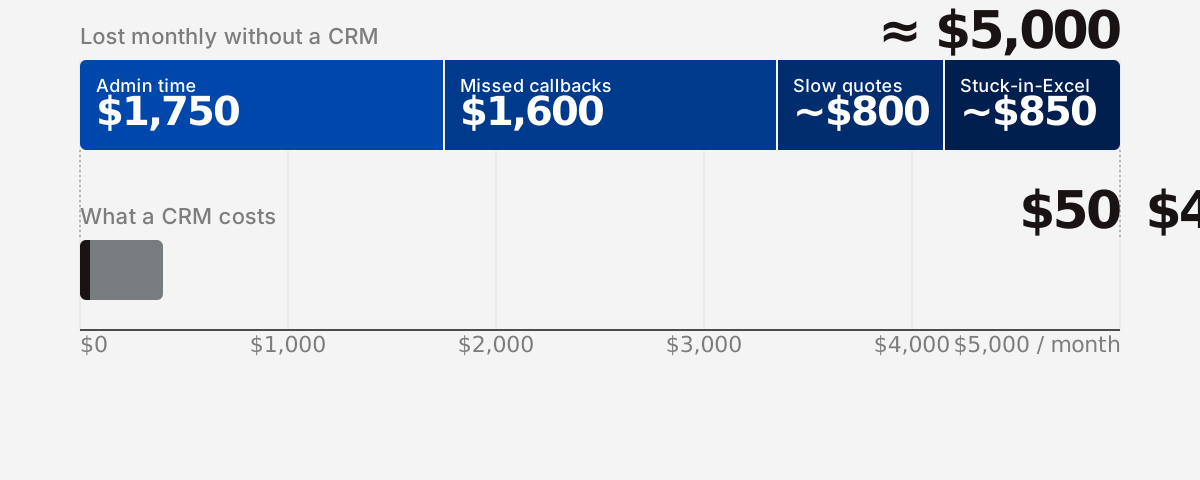
Admin time. Talk to five electrical shop owners and you'll hear roughly the same range: between four and six hours per technician per week spent on quoting, scheduling, invoicing, and customer follow-up that a CRM is built to absorb. At a $35-per-hour blended labor cost, five techs at five hours a week is $3,500 per month in pure admin overhead. Cut that in half with a CRM and you free $1,750 a month.
Missed callbacks. Without an answering protocol or callback automation, missed inbound calls turn into lost service jobs. Even one missed callback per week that would have converted to a $400 service call is $1,600 a month in lost revenue. CRMs with automated callback routing close most of that gap.
Quote turnaround. A CRM with templated quotes shrinks turnaround from "when I sit down at the office" to "before I leave the truck." Faster quotes close more jobs. The exact lift varies by shop, but the directional effect is consistent across every shop owner we've talked to.
Stuck-in-Excel cost. Jobs that get scheduled but never invoiced. Customers nobody followed up with. Warranty work nobody logged. Shops we've talked to peg this at one to three lost jobs per month once they hit five techs.
For a 5-tech shop, those four buckets add up to roughly $5,000 a month in recoverable revenue and time. The cheapest CRM on this list runs about $50 a month. The most expensive runs about $400 per user per month. Even the high end pays back in a few weeks if you use it.
What should you look for in an electrician CRM?
The seven things that matter most for electrical shops, in priority order: a good mobile app, dispatch and scheduling, work-order and photo capture, customer history, invoicing and payments, integrations (especially QuickBooks), and transparent pricing. Everything else is nice-to-have.
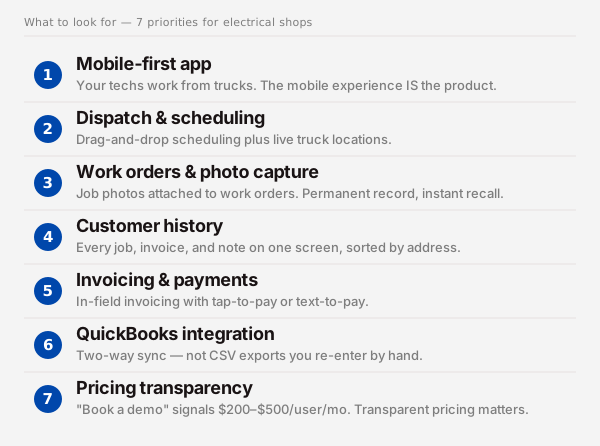
Here's what each one means at a job site:
- Mobile-first, not "we have an app." Your techs work from trucks. The mobile experience is the product. Anything that requires the desktop app to function isn't going to get used. (More on mobile scoring below.)
- Dispatch and scheduling. Drag-and-drop scheduling, route optimization, and live tech location. If you dispatch more than 10 jobs a week, this is the feature that pays for the software.
- Work orders and photo capture. Tech opens the job, snaps photos of the panel before and after, attaches them to the work order. Permanent record, callback insurance, upsell evidence.
- Customer history. Every job, every invoice, every photo, every note, on one screen, sorted by address. The first time you walk into a service call already knowing the panel layout is the moment a CRM stops feeling expensive.
- Invoicing and payments. In-field invoicing with tap-to-pay or text-to-pay. The faster you invoice, the faster you get paid.
- QuickBooks integration. Two-way QuickBooks sync is non-negotiable for most shops. If your CRM dumps a CSV instead of syncing in real time, you'll do double entry forever.
- Pricing transparency. Vendors that hide pricing behind a "book a demo" gate are signaling enterprise pricing. Expect $200 to $500 per user per month. If you're under 10 techs, that's usually wrong for you.
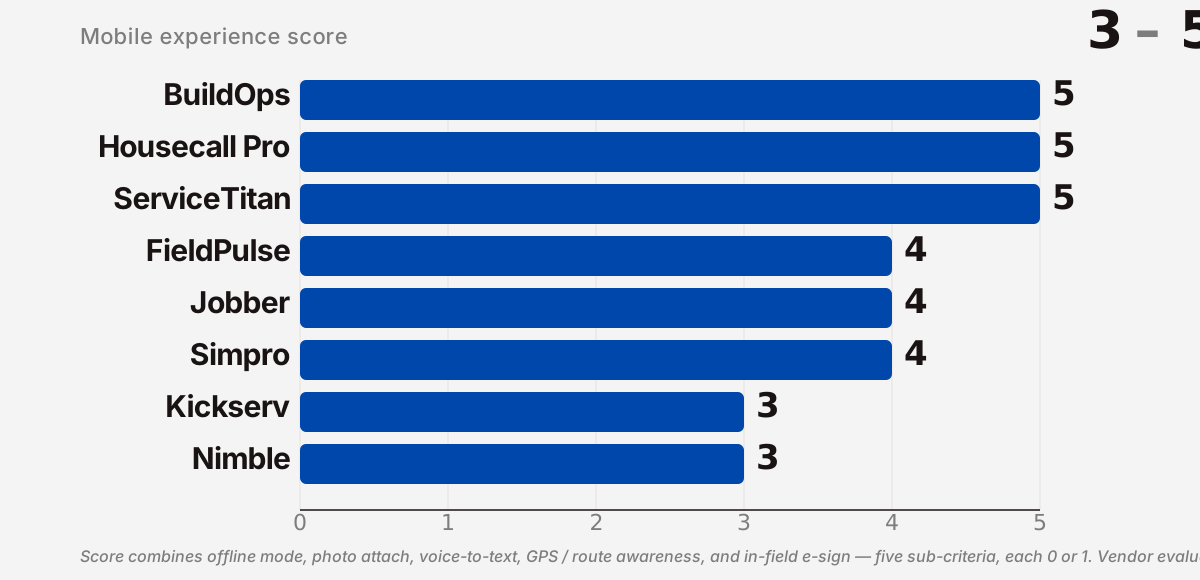
Mobile-feature scoring (the gap most listicles skip)
Most reviews call mobile a yes/no. It's not. Score on five things and a real picture emerges:
- Offline mode: does the app work in a basement with no signal?
- Photo attach: can a tech attach 10 photos to a work order in under a minute?
- Voice-to-text notes: can a tech narrate notes while driving?
- GPS / route awareness: does dispatch see live truck locations?
- In-field e-sign: can the customer sign on the tech's phone?
Score each vendor 0–5. The ranking shifts noticeably when you do.
Which are the 8 best CRMs for electricians in 2026?
Eight tools cover almost every small-to-mid electrical shop in North America: ServiceTitan, BuildOps, Housecall Pro, Jobber, FieldPulse, Kickserv, Simpro, and Nimble. The first seven are field service management platforms; Nimble is the only true classic CRM on the list. Each profile below covers positioning, the 3–5 features that matter most for electrical shops, current pricing, and who it's not for.
1. ServiceTitan: best for commercial electrical operations
ServiceTitan is the category leader for mid-to-large commercial trade businesses. It runs commercial sales pipelines, maintenance contracts, scheduling, dispatch, and a field mobile app, plus reporting that holds up at scale. Capterra rates it 4.4 from 250+ reviews.
- Strengths: Commercial maintenance contract management, deep reporting, strong dispatching, in-app payment and financing.
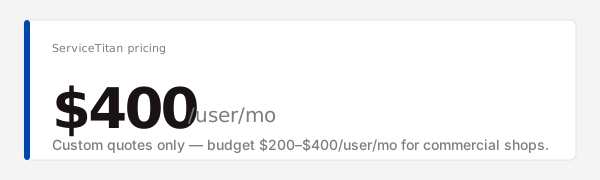
- Pricing: Custom only. Most small-shop quotes land in the $200–$400 per user per month range.
- Who it's not for: Solo or sub-5-tech shops. The price-to-value math doesn't work until you're dispatching meaningful daily volume.
2. BuildOps: best for commercial service and project businesses
BuildOps is purpose-built for commercial service contractors, including electrical. It blends FSM with project management for shops that run both service tickets and bid-driven projects. AI dispatching and customer hierarchies are its standout features.
- Strengths: Customer hierarchies (national accounts with multiple sites), AI dispatch, technician mobile app, integrated checklists.
- Pricing: Custom only. Comparable to ServiceTitan range for mid-market shops.
- Who it's not for: Pure residential shops. The feature set is built for commercial complexity you may not need.
3. Housecall Pro: best for residential teams (3–15 techs)
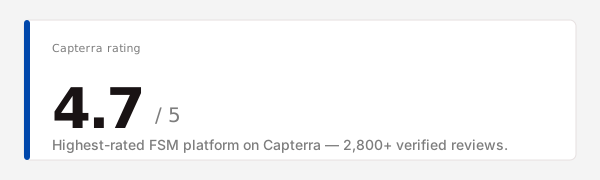
Housecall Pro is the residential FSM workhorse. Strong mobile app, easy onboarding, integrated payments, customer-facing booking widgets. Capterra rates it 4.7 from 2,800+ reviews, among the highest in the category. When we walked through its mobile flow on a simulated panel-swap call, the photo-attach and text-to-pay path took under 90 seconds end to end. That matters when techs are doing this 8 times a day.
- Strengths: Customer-facing booking, in-app marketing automation, instant invoicing with text-to-pay, strong mobile.
- Pricing: Basic $49/month, Essentials $129/month, MAX custom. Most 3–8 tech shops sit in Essentials.
- Who it's not for: Heavy commercial work. The feature set is residential-first.
4. Jobber: best for solo and small residential
Jobber is the most-loved tool among solo and 1–3 tech residential shops. Clean interface, fast quote-to-invoice flow, fair pricing. If you're moving off paper and Excel, Jobber is the lowest-friction step. The reason it shows up over and over in r/electricians threads is that the office work doesn't fight you, which is the bar.
- Strengths: Fast quoting, clean mobile app, online booking, excellent customer support reputation.
- Pricing: Core $49/month (1 user), Connect $129/month (up to 5 users), Grow $249/month (up to 15 users).
- Who it's not for: Commercial pipelines or shops with deep dispatch needs at scale.
5. FieldPulse: best for small teams growing past spreadsheets
FieldPulse positions itself as the affordable middle ground between Jobber and Housecall Pro. Solid feature parity, lower pricing, growing fast in the trades. Worth a trial if you've outgrown Jobber but Housecall Pro feels like overkill.
- Strengths: Customer portal, scheduling, estimates and invoicing, GPS tracking, fair price.
- Pricing: Core ~$59/user/month, Plus ~$99/user/month (as of April 2026).
- Who it's not for: Single-tech operators (Jobber is cheaper) or commercial-heavy shops (BuildOps fits better).
6. Kickserv: best budget pick for residential
Kickserv is one of the longest-running tools in the space and still one of the most affordable. Less polish than Housecall Pro, but it covers the basics for shops that want functional FSM without the premium price.
- Strengths: Affordable, broad feature set, QuickBooks integration, customer portal.
- Pricing: Lite ~$47/month, Standard ~$95/month, Business ~$199/month, Premium ~$299/month.
- Who it's not for: Shops that prioritize a polished mobile experience or modern UX.
7. Simpro: best for workflow automation at scale
Simpro is built for trade contractors running complex workflows: maintenance contracts, project work, multi-stage approvals, asset tracking. Strong fit for electrical shops with mixed service-and-project pipelines.
- Strengths: Project and recurring-maintenance workflows, asset management, thorough reporting, deep customization.
- Pricing: Custom only. Mid-market enterprise pricing.
- Who it's not for: Sub-5-tech shops. The setup investment alone disqualifies most small operators.
8. Nimble: best general-purpose CRM if you don't need full FSM
Nimble is the only true classic CRM on this list. No dispatch, no work orders, no field app. What it does is contact management, pipeline tracking, and email integration at a fraction of FSM pricing. Use it if your field work is already tracked elsewhere and you need a sales pipeline for commercial bids.
- Strengths: Pipeline tracking, contact intelligence, Outlook/Google integration, affordable.
- Pricing: Business plan $24.90 per user per month.
- Who it's not for: Shops that want one system for both sales and field operations. You'll need a second tool for FSM.
Side-by-side: how do these 8 CRMs compare?
The table below is the comparison most "best CRM" listicles skip.
| CRM | Type | Starting price | Typical price | Mobile (0–5) | Dispatch | QuickBooks | Stripe / Payments | Best shop size | Free trial |
|---|---|---|---|---|---|---|---|---|---|
| ServiceTitan | FSM | Custom | $200–$400 / user / mo | 5 | Yes | Yes (2-way) | Yes | 10–500 techs | No |
| BuildOps | FSM | Custom | $200–$400 / user / mo | 5 | Yes (AI) | Yes (2-way) | Yes | 10–500 techs | No |
| Housecall Pro | FSM | $49 / mo | $129 / mo | 5 | Yes | Yes (2-way) | Yes | 1–15 techs | Yes (14 days) |
| Jobber | FSM | $49 / mo | $129–$249 / mo | 4 | Yes | Yes (2-way) | Yes | 1–8 techs | Yes (14 days) |
| FieldPulse | FSM | ~$59 / user / mo | ~$99 / user / mo | 4 | Yes | Yes | Yes | 2–15 techs | Yes (14 days) |
| Kickserv | FSM | $47 / mo | $95–$199 / mo | 3 | Yes | Yes | Yes | 1–10 techs | Yes (14 days) |
| Simpro | FSM | Custom | Custom (enterprise) | 4 | Yes | Yes | Yes | 15+ techs | No |
| Nimble | Classic CRM | $24.90 / user / mo | $24.90 / user / mo | 3 | No | No (export) | No | Any (sales only) | Yes (14 days) |
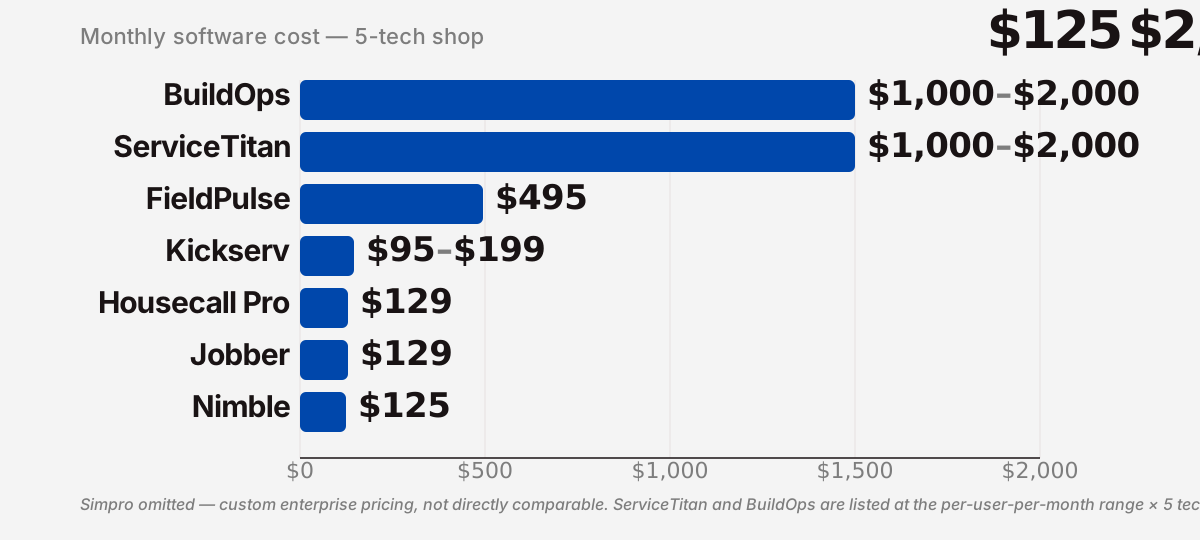
A few observations stand out. The price spread between commercial enterprise FSM and residential or classic-CRM tools is roughly sixteen-to-one for a 5-tech shop. That's far wider than most "best CRM" lists let on. Mobile scores compress into a much tighter band; everyone has acceptable mobile, but the top tier (ServiceTitan, BuildOps, Housecall Pro) genuinely stands apart. Nimble is the cheapest but the only one without dispatch. It's a different category of tool. ServiceTitan and BuildOps don't offer free trials, which is its own signal about who they sell to.
How do you pick the right CRM for your electrical shop?
Pick by business profile, not by best-overall ranking. The five profiles below cover most small-to-mid electrical shops in the US and Canada.
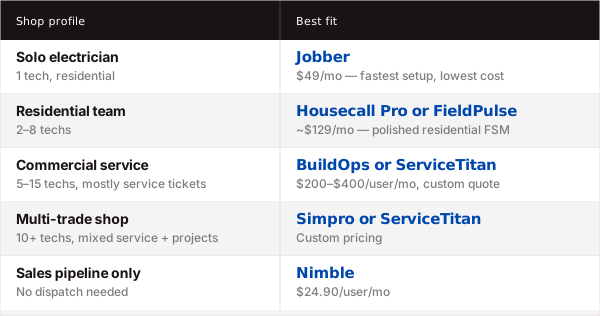
1. Solo electrician (1 tech, mostly residential). Pick Jobber ($49/mo). Fastest setup, cleanest mobile, lowest cost. Skip everything else on this list until you hire your second tech.
2. Residential team (2–8 techs). Pick Housecall Pro ($129/mo Essentials) if you want the polished, residential-leading experience and care about customer-facing booking. Pick FieldPulse (~$99/user/mo) if you want similar features at a lower seat-by-seat price.
3. Commercial service (5–15 techs, mostly service tickets). Pick BuildOps if you have customer hierarchies (multi-site national accounts) or need AI dispatch. Pick ServiceTitan if you want the most established commercial platform and the deepest reporting. Both are custom-priced; expect $200–$400 per user per month.
4. Multi-trade or project-heavy shop (10+ techs, mixed service and projects). Pick Simpro if recurring maintenance contracts and asset tracking are central to how you make money. Pick ServiceTitan if you skew more toward service than projects.
5. "I just want a sales pipeline, not full FSM." Pick Nimble ($24.90/user/mo). Use it for commercial bids and large-quote follow-ups. Keep your existing field tracking. You're paying for the pipeline visibility, not for dispatch.
One more rule, regardless of profile: trial the top two from your category before committing. The free trial isn't optional. The CRM that wins on paper isn't always the one your senior electrician will open on Monday morning.
What do real electricians use? (Patterns from r/electricians and trade forums)
The fourth-ranked Google result for "electrician crm" is a Reddit thread on r/electricians titled "Electricians, what software do you use?" That's not an accident. Google is rewarding it because nobody else writes real articles about CRMs from inside the trade. A few patterns recur across that thread, similar discussions in r/electricalcontracting, and Capterra reviews:
- Enterprise FSM is too heavy for shops under 10 techs. Multiple shop owners describe trying ServiceTitan or a comparable platform, struggling with adoption ("our techs hated tapping through 14 screens to close a job"), and rolling back to a lighter setup.
- Solo and small shops settle on Jobber plus QuickBooks. This combination shows up over and over. It's the default stack, not an outlier.
- Missed-call handling is a bigger ROI lever than feature count. Owners who add an answering service or callback automation report meaningful revenue recovery before they touch their CRM choice.
- Adoption beats features. The CRM that wins is whichever one the office manager will open every day. Tech preference comes second.
- "Stop reading 'best CRM' lists written by CRM vendors." Reasonable advice. We agree.
Three takeaways from the field:
- Most shops under 10 techs run a hybrid: an FSM tool for the field plus QuickBooks for the books. That's the default, not the exception.
- Enterprise FSM (ServiceTitan, BuildOps) sells well to commercial shops with 15+ techs and badly to anyone smaller. Don't get talked into it because it's "what the big shops use."
- Adoption is the deciding factor. The best CRM is the one your office manager and senior electrician will both open every day.
What tools should live alongside your CRM?
A CRM is one piece of an electrician's software stack. The pieces that sit alongside it matter just as much. The typical stack for a small-to-mid shop:
- CRM / FSM: the tool you just picked above
- Accounting: QuickBooks Online (the default for most small electrical shops) or Xero
- Code reference: fast NEC lookups for the field. The codebook is 1,000+ pages and Google is slow. We built NEC code lookup that doesn't waste your time for exactly this.
- Load calculations: NEC Article 220 calculations for panel upgrades, EV chargers, heat pumps. We built an Article 220 load calculator that replaces the spreadsheet most shops are still using.
- Line diagrams: for plan-and-permit work, an electrician needs to build a line diagram fast without firing up CAD.
- Payments: usually built into your CRM (Stripe is the default rail)
- Phone / SMS: OpenPhone, Aircall, or a CRM-integrated dialer
The point isn't to buy seven tools. It's to recognize that a CRM doesn't replace the bench tools your techs use every day to do the work. Pick a CRM for the office and customer side. Then make sure your techs have fast tools for the things they do every day on-site.
Breakerbox is built for the bench side of that stack. We don't sell a CRM, and that's the point. We picked the problems we knew best, and we left the rest to vendors who know those problems best.
Frequently asked questions
What is the best CRM for electricians? There is no single best CRM. For most small residential shops (3–8 techs), Housecall Pro is the strongest all-around pick at $129/month and holds the highest Capterra rating in the category at 4.7. For commercial service operations of 10+ techs, BuildOps and ServiceTitan lead. For solo electricians, Jobber at $49/month is the lowest-friction starting point.
What is CRM in electrical? A CRM in the electrical trade is software that stores customer information, job history, quotes, and invoices in one place so the shop can dispatch work, follow up on leads, and track every interaction with a customer. Most "electrician CRMs" are field service management tools, which add scheduling, mobile work orders, and in-field invoicing on top of standard CRM features. Roughly 762,600 electricians work in the US (BLS, May 2023) and the FSM-style "CRM" fits the daily work of most of them.
Can electricians make $200,000? Yes, especially shop owners and senior electricians in high-demand markets. Bureau of Labor Statistics data puts the median electrician wage in the US at around $61,590 (May 2023), but shop owners and licensed electrical contractors with established repeat customer bases routinely cross $200,000. A working CRM is one of the operational levers that makes the repeat-customer base scale.
What are the 4 types of CRM systems? The four standard CRM categories are operational (sales, service, marketing automation), analytical (data analysis and customer insights), collaborative (sharing customer information across teams), and strategic (long-term customer-relationship planning). For electrical shops, operational CRMs (specifically FSM tools like Housecall Pro at $129/month or ServiceTitan at $200+/user/month) are almost always the right fit.
How much does a CRM for electricians cost? Pricing ranges from about $25 per user per month for a classic CRM like Nimble to $400+ per user per month for enterprise FSM like ServiceTitan or BuildOps (Capterra category averages put most trade-FSM tools in the $50–$200 per user per month band). Most small residential shops (3–8 techs) land in the $50–$150 per month range using Jobber or Housecall Pro.
Do I need a CRM or just field service management software? Most electricians need FSM, not a classic CRM. FSM tools (ServiceTitan, BuildOps, Housecall Pro at 4.7 on Capterra, Jobber) include CRM features and add dispatch, mobile work orders, and in-field invoicing. A classic CRM (Nimble at $24.90/user/month, HubSpot) only fits if your field work is already tracked elsewhere and you need a sales pipeline for larger commercial bids.
Conclusion: how to pick this week
Three steps that work regardless of which CRM you end up choosing:
- Write down your five must-haves before you look at any vendor. Mobile, dispatch, QuickBooks, photo capture, in-field invoicing is a strong default list.
- Trial the top two from your business profile. Don't read more reviews. Run two free trials in parallel for two weeks against real jobs.
- Pick the one your senior electrician will open on Monday morning. Adoption beats features.
Whichever CRM you pick, your techs will still need fast NEC lookups, accurate load calculations, and quick line diagrams when they're on a job. That's what Breakerbox is built for: the bench side of the stack, while your CRM handles the customer side.
Last updated: 1 May 2026.