TL;DR: Pick by how you bill. Flat-rate residential shops fit Housecall Pro or Jobber; T&M crews fit FieldPulse or FieldEdge; AIA progress billing needs BuildOps or ServiceTitan. Solo electricians should stay on QuickBooks Online plus Joist Free. ACH instead of cards saves about $30 per $1,200 invoice.
Send the same $1,200 service-call invoice through a credit card processor and it costs you about $35.10 in fees. Send it through ACH and it costs about $5. That's a $30 delta per ticket. Run one invoice a day, five days a week, and the card surcharge bleeds roughly $7,800 a year off a shop that hasn't checked which button the customer is clicking. That is what good electrician invoicing software is for: making the cheap path the default and the friction path the exception.
We build the broader electrician software stack on the bench-side: load calcs, NEC lookup, line diagrams. Breakerbox does not sell invoicing software. So this is the independent buyer's guide we wished existed when we were watching residential shops eat 2.9% on every card-paid invoice and not knowing they could route customers to ACH for $5 flat.
A quick disclosure: We build bench-side software for electricians (NEC reference, load calculations, line diagrams) and do not sell invoicing, payment processing, CRM, or FSM software. We take no affiliate fees from any vendor in this guide. Pricing was verified on vendor sales calls and public pricing pages in June 2026. Refresh quarterly before buying.
What does electrician invoicing software do?
Electrician invoicing software turns the work a tech finishes at the job site into a billable invoice the customer can pay on their phone, then pushes the result to QuickBooks so the books match. That is the whole job. Roughly 762,600 electricians work in the US and the great majority bill manually or through QuickBooks alone today (BLS, May 2023). Invoicing tools exist to remove the gap between truck and ledger.
The baseline features every tool in this guide covers: mobile invoice creation, customer-facing payment links (card and ACH), photo attachments per line item, e-signature capture, automated payment reminders, and QuickBooks Online sync. Anything extra (recurring service agreements, deposit collection, batch billing, AIA G702/G703 progress billing) shows up at the higher tiers.
Self-contained answer: Electrician invoicing software turns finished job-site work into a paid invoice the customer can settle from their phone, then syncs the result to QuickBooks. It splits into three tiers by feature density: free or near-free mobile apps ($0 to $30/month), dispatch-bundled platforms ($79 to $189/user/month verified June 2026), and FSM-bundled suites ($150 to $400+/user/month). Most 1 to 15-person residential shops fit the dispatch-bundled tier. Solo electricians fit the free-app tier. Shops past 15 techs or with heavy AIA commercial work fit FSM-bundled.
Three things separate a good invoicing tool from a mediocre one for an electrician specifically. The first is whether ACH is a real first-class payment option or an afterthought buried behind a checkbox. The second is whether the mobile app can stitch a panel photo to a line item before the tech leaves the driveway. The third is whether QuickBooks sync is two-way and clean, or one-way with monthly reconciliation pain.
How do electrical shops actually bill, and why does that pick the software?
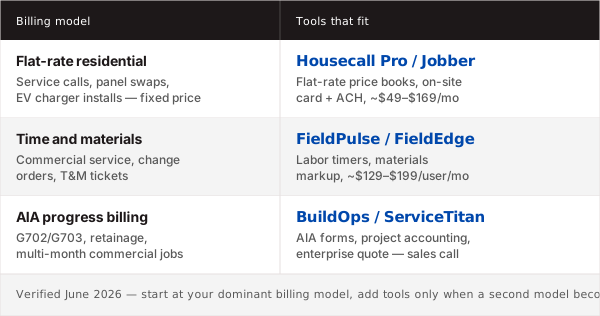
How you bill picks the software because the three real billing models in residential and commercial electrical work map cleanly onto three different tool tiers. Flat-rate residential service calls, T&M (time and materials) commercial service, and AIA G702/G703 progress billing for project work each push the tool into a different feature set. Vendor-published roundups ignore this and rank by company size instead. That is the wrong axis.
Flat-rate residential service
Flat-rate is the dominant residential model: the tech quotes a fixed price for a defined job (panel swap, ceiling fan install, breaker replacement, troubleshooting hour) and the customer pays that flat price regardless of how long the work takes. The invoicing tool has to support a price book of pre-built flat-rate items, customer-facing quotes that convert to invoices with one tap, and clean mobile presentation. Housecall Pro and Jobber are the strongest fits at $79 to $189/month verified June 2026.
T&M commercial service
T&M crews bill by labor hours and materials with markup. The tool has to time-track per job, capture material costs as the tech buys them, and apply a markup rule per material category. FieldPulse and FieldEdge handle this best. ServiceTitan can too at four times the cost. Solo or two-person T&M shops do fine with QuickBooks Online plus a time-tracking add-on instead of buying a full FSM.
AIA progress billing
Commercial contractors working on multi-month projects bill against a schedule of values using AIA G702 (application for payment) and G703 (continuation sheet). Most invoicing tools do not produce G702/G703 documents at all. BuildOps and ServiceTitan are the two that do natively. If you run any meaningful commercial project work and someone asks you for a G702 once a month, the rest of the tools in this guide do not fit your workflow.
Which is the best electrician invoicing software in 2026?
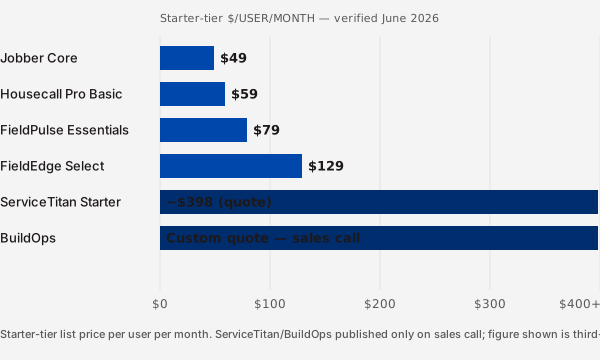
There is no single best tool because the six leading platforms each fit a different shop profile. The dated comparison below is what each vendor quoted publicly or by sales call in June 2026, normalized per user per month where the vendor sells flat-rate plans. Anchor the choice on billing model and QuickBooks setup first; cost second.
You can also see the full electrician business software comparison for the broader stack including CRM, scheduling, and accounting.
| Tool | Best for billing model | Starter price (verified June 2026) | QBO sync | QB Desktop sync | Card / ACH fee | Mobile rating |
|---|---|---|---|---|---|---|
| BuildOps | AIA progress / commercial | Custom (sales call quotes $250+/user/mo, may vary) | Yes (two-way) | Limited (manual export) | 2.9% card / ACH via Stripe ~$5 cap | Strong (iOS/Android) |
| ServiceTitan | AIA progress / large residential | Starting at $398/user/mo (verified June 2026, may vary) | Yes (two-way) | Yes | 2.65% card / 0.8% ACH capped $5 | Strong |
| Housecall Pro | Flat-rate residential | Basic $79/mo (1 user), Essentials $189/mo (up to 5 users) | Yes (two-way) | No | 2.59% to 3.5% card / 1% ACH capped $10 | Strongest consumer-facing |
| Jobber | Flat-rate residential | Core $69/mo (1 user), Connect $169/mo (up to 7) | Yes (two-way) | No | 2.7% card / 1% ACH capped $10 | Strong, easiest learning curve |
| FieldEdge | T&M commercial service | Starting at $150 to $200/user/mo (verified June 2026, may vary) | Yes | Yes (cleanest of group) | Custom via processor partner | Solid, dated UI |
| FieldPulse | T&M commercial service | Starter $79/user/mo, Pro $99/user/mo | Yes | No | 2.9% card / 1% ACH capped $10 | Strong, newer build |
Pricing verified 2026-06. Refresh quarterly before buying. BuildOps, ServiceTitan, and FieldEdge gate their pricing behind sales calls, so the starter tiers carry a "may vary" caveat. Card and ACH fees come from each tool's payment-processor partner (Stripe, Square, or in-house) and shift with contract terms and volume.
The bottom line on this table: Housecall Pro or Jobber win for flat-rate residential at $69 to $189/month. FieldPulse wins for T&M crews under 15 techs at $79 to $99/user/month. BuildOps or ServiceTitan win for AIA progress billing, and the price reflects the workload they handle.
How much do credit card fees actually cost you per invoice?
Credit card fees cost roughly $35.10 on a $1,200 invoice at standard processor rates, while ACH on the same invoice costs about $5 with most processor caps. That is a $30 delta per ticket. The exact math: 2.9% of $1,200 plus a $0.30 fixed fee equals $34.80 plus $0.30, or $35.10 on the card side. ACH at 0.8% of $1,200 equals $9.60, but Stripe and most platform partners cap ACH at $5 per transaction (Stripe pricing, 2026-06). Square ACH runs 1% with a $1 minimum (Square pricing, 2026-06).
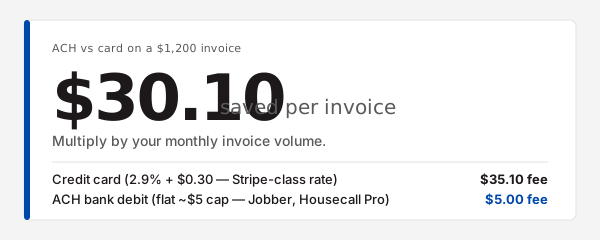
The annual picture. A shop running one $1,200-range invoice a day, five days a week, eats roughly $7,800 a year in card fees that ACH would knock to $1,300. That is a $6,500 swing on a single payment-method default. Annualize across a 5-tech shop running 4 to 6 jobs a day at smaller average ticket sizes and the delta still lands between $4,000 and $9,000 a year. The number is not small.
NACHA reported 33.6 billion ACH payments moved through the network in 2024, growing at roughly 6% year over year (NACHA, 2025). Customers are conditioned to pay via ACH for rent, utilities, and increasingly trade services. The friction objection ("my customers won't use it") is mostly out of date.
The shop-side fix has two parts. First, set the default payment method on the customer-facing invoice page to ACH and present card as the secondary option. Housecall Pro, Jobber, and FieldPulse all let you do this. Second, on invoices over $1,000, add a line on the printed invoice that reads "ACH preferred to keep fees low." Half the customers who would have grabbed a card click ACH instead.
A handful of tools let you surcharge cards: pass the 2.9% directly to the customer at checkout. Legal in most states with disclosure, illegal in a few (California, Connecticut, Florida had restrictions through 2024). Check the surcharge law in your state before turning it on.
How do you send an invoice from the job site?
You send the invoice from the truck the same way the tech writes it: open the job in the mobile app, snap a photo of the finished work, attach it to the line item, add labor and materials, capture the customer's e-signature on the phone screen, and tap send with a payment link. The whole flow runs in roughly four minutes once the tech does it twice. Done before the truck pulls out of the driveway.
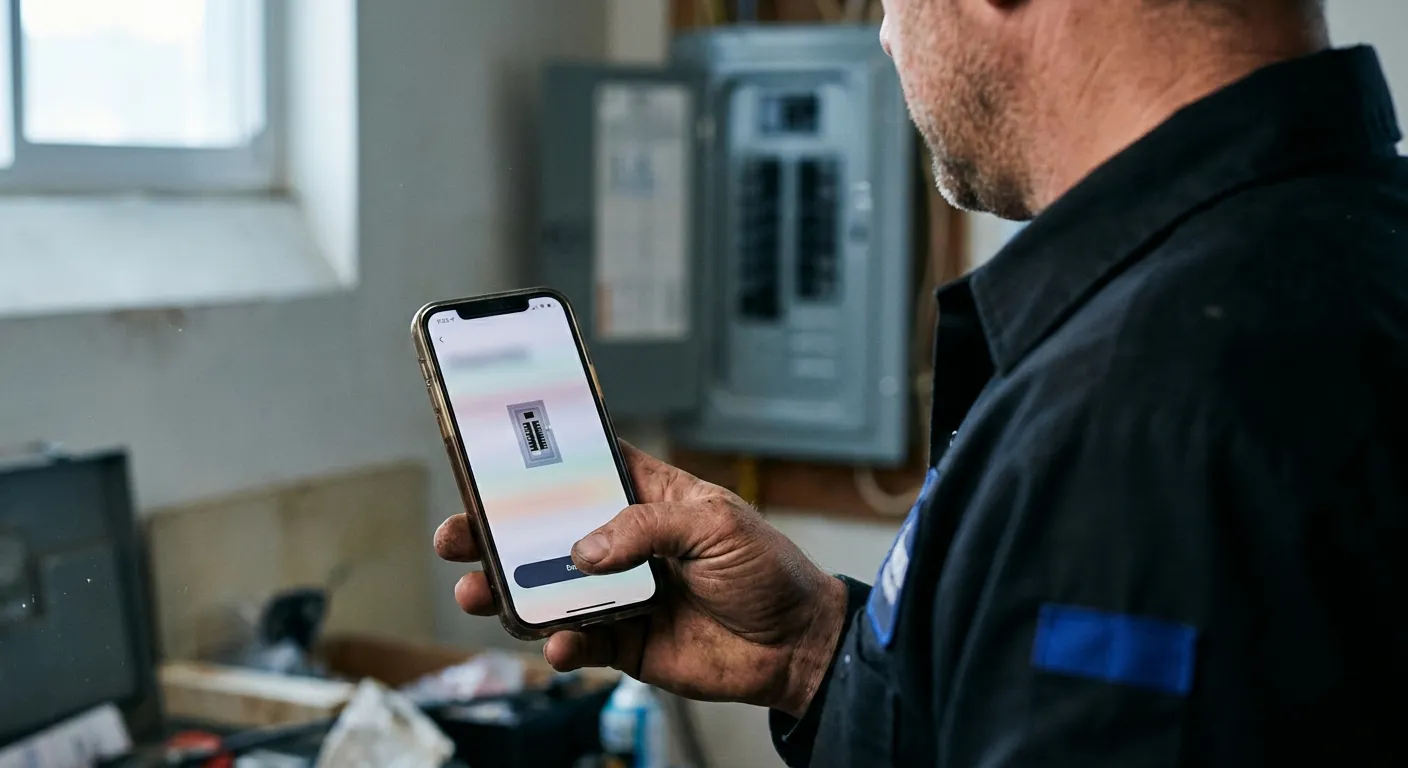
The five-step walkthrough below is the same beat across Housecall Pro, Jobber, FieldPulse, and ServiceTitan. The UI labels differ but the steps do not.
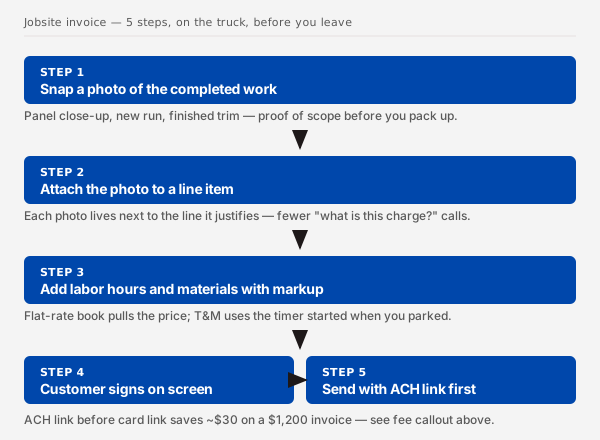
- Open the job and take the rough-in or finish photo. Most tools open the camera directly from the job record. The photo lands in the job's media gallery automatically.
- Attach the photo to a line item. Drag or tap-to-attach the photo onto the line item it documents. The line item now carries the proof the work was done.
- Add labor hours and material lines. Pull labor from the price book if you flat-rate, or punch in actual hours if T&M. Materials get added with markup applied automatically per category.
- Capture the e-signature on the phone. Hand the phone to the customer; they sign with a finger on the screen. The tool timestamps the signature and embeds it in the invoice PDF.
- Send with the ACH link as default. Tap send. The customer gets an email and text with a clickable payment page. ACH is the default button; card is the secondary.
We watched one shop run the same $1,200 panel-swap invoice through this flow at 4:47 PM on a Friday and collect ACH payment at 5:11 PM the same day. The job was closed before dispatch was. That is the difference between a paper invoice mailed Monday and a mobile invoice sent at the tailgate.
Do solo electricians need a $300/user/month platform?
Solo electricians do not need a $300/user/month platform because the features that justify the price (dispatch board, multi-tech routing, marketing automation, deep price book) sit unused at solo volume. A $30/month QuickBooks Online subscription plus a free invoicing app does the work. The first time we watched a solo electrician try to justify a $300/user/month platform on 8 invoices a month, the math just did not work.
The solo stack we recommend. QuickBooks Online Simple Start at roughly $30/month (verified June 2026, may vary) plus Joist Free or Square Invoices on the phone. Total cost: $30/month. The Joist app handles mobile invoice creation, customer-facing payment, and photo attachments. QuickBooks Online handles books, sales tax, and year-end. The two do not auto-sync (you re-enter invoices into QBO), but at 8 to 20 invoices a month, re-entry takes 10 minutes a week. The $270/month savings versus a dispatch-bundled tool pays for an apprentice hour.
When to upgrade. Three triggers move a solo shop off the free stack. First, a second tech joining means dispatch and shared calendars start to matter; that is the trigger to move to dispatch-first. Second, customer volume past roughly 40 invoices a month makes manual re-entry into QuickBooks painful enough to justify the integration fee. Third, if leads start coming through a quote pipeline rather than direct calls, the shop is outgrowing solo-mode entirely; that is when the CRM question shows up. We covered that side in our electrician CRM options for lead-to-quote guide.
The honest framing: a solo electrician on QBO plus Joist is not under-equipped, they are correctly-equipped. The vendor pitch that says otherwise is selling tier headroom no solo operation uses.
What's the best mobile invoicing app for electricians?
The best mobile invoicing app for an electrician depends on whether you want fully free, lightweight paid, or already-on-Square. Joist is the strongest free option, Invoice Simple is the best lightweight paid pick at roughly $10/month, and Square Invoices wins if you already run a Square Reader for in-person card swipes. All three handle mobile invoice creation, photo attachments, and customer payment links without dispatch-board overhead.
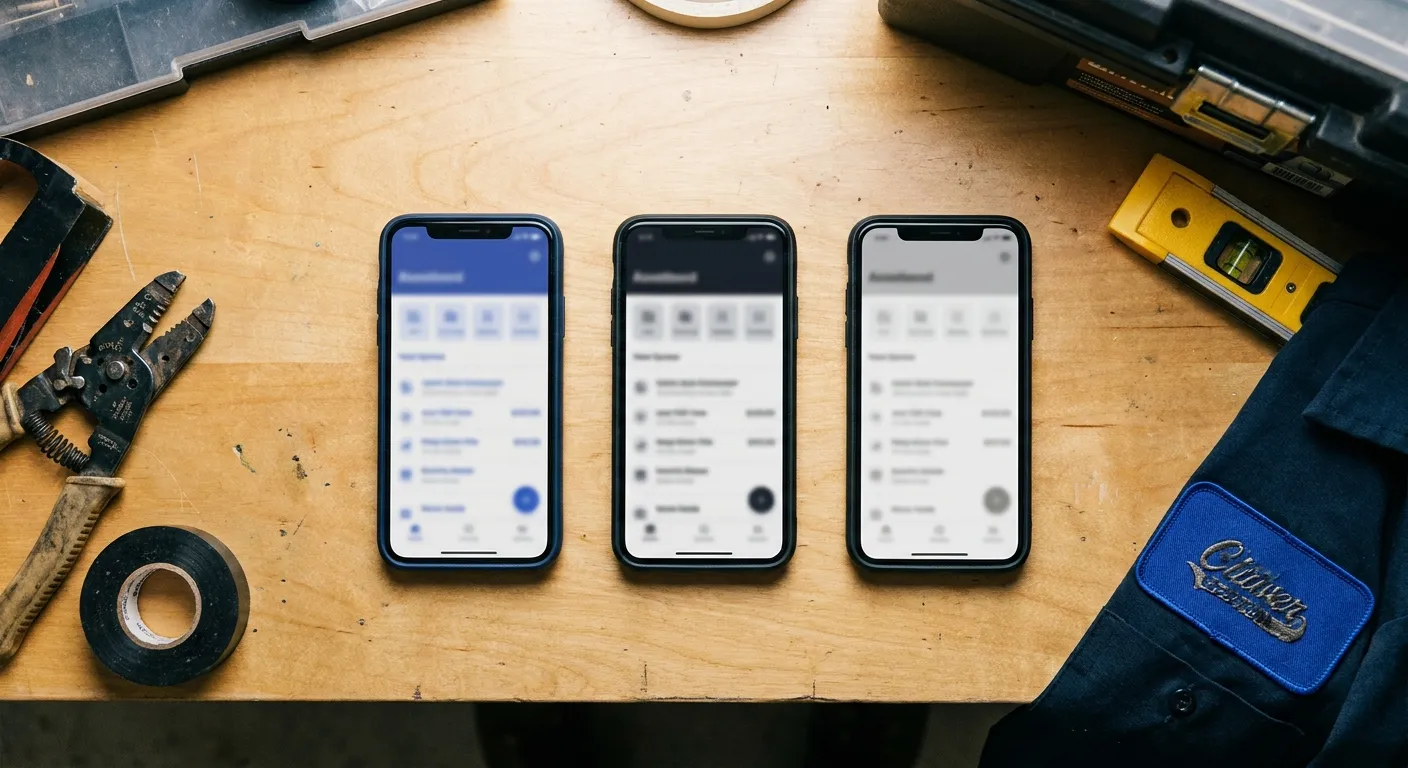
The three picks.
- Joist. Free tier covers unlimited invoicing, estimates, and customer payment via card or ACH (ACH processed through Stripe at 1% capped $10, verified June 2026). Pro tier at roughly $14/month adds QuickBooks Online sync and unbranded customer-facing invoices. Best free option in the category.
- Invoice Simple. Premium at $9.99/month (verified June 2026, may vary). Cleanest UI of the three, fastest learning curve for someone coming off paper. No QuickBooks sync at the entry tier; export to PDF or CSV instead. Best lightweight paid pick.
- Square Invoices. Free for unlimited invoices, plus 3.3% + $0.30 card / 1% ACH on payments processed (verified June 2026; Square's invoice rate runs higher than its in-person Reader rate of 2.6% + $0.10). Best fit if you already run a Square Reader for in-person card swipes; the dashboard unifies in-person and invoice payments. Skip if you do not already have Square hardware; the invoice fees run higher than processors you can pair with Joist.
The App Store and Play Store note: every tool above ships a native iOS and Android app. Joist and Invoice Simple both work offline (draft an invoice without signal, sync when the truck hits coverage). Square requires connectivity for payment but lets you draft invoices offline.
For the solo electrician reading this who already lives in QuickBooks Online: pair QBO with Joist Free. Total cost $30/month. That stack does what the $300/user/month platforms do at solo volume, without the seat-fee tax.
Frequently Asked Questions
What should be on an electrician's invoice?
An electrician's invoice needs eight elements to be complete and collectible: business name and license number, customer name and job address, scope description, itemized materials with quantity and unit cost, itemized labor hours and rate, sales tax line, total due, and payment terms with the ACH and card link. Many states require the license number by law (NASCLA contractor licensing summary, 2025). Skip it and the invoice can be disputed.
Is there a free invoicing app for electricians?
Yes. Joist Free, Square Invoices, and Wave are all free invoicing apps with no monthly subscription. Joist is the strongest electrician-specific pick because it handles estimates, customer payment links, and photo attachments without a paywall. Wave is broader small-business focused but free for unlimited invoicing. All three charge processor fees on payment (2.9% card, 1% ACH typical) but no platform fee.
How do I get paid faster as an electrician?
You get paid faster by collecting a deposit on jobs over $2,000, sending invoices from the truck before leaving the driveway, defaulting the customer-facing payment page to ACH instead of card, and running a day 7 / day 14 / day 30 automated reminder cadence. Shops doing all four typically collect inside a week on the majority of invoices, versus 30+ days for mailed paper invoices. Progress invoicing on longer projects also pulls cash forward by billing at milestones rather than at job completion (Jobber, progress invoicing).
The decision shortcut
Three things separate a shop that picks the right invoicing tool from one that overpays for a year and then switches. First, name your billing model out loud (flat-rate residential, T&M commercial, AIA progress) and pick from the matching column. Second, run your $1,200 invoice math on ACH versus card and turn ACH on as the default. Third, if you are solo, stay on QuickBooks Online plus Joist Free and ignore the $300/user/month upsell entirely.
The shortcut version:
- Flat-rate residential, 1 to 15 techs: Housecall Pro or Jobber at $69 to $189/month.
- T&M commercial service, 3 to 15 techs: FieldPulse at $79 to $99/user/month.
- AIA progress billing on commercial projects: BuildOps or ServiceTitan, starting at $250 to $398/user/month (verified June 2026, may vary).
- Solo or 1 to 2 techs at low volume: QuickBooks Online plus Joist Free at $30/month.
- Already on Square hardware: Square Invoices, free platform fee, processor fees only.
If you have a service-call quote that depends on a panel upgrade or a new circuit, run the math first in the free residential load calculator before the invoice gets cut. Right service size first, right invoice second.