
TL;DR: "Electrician software" is not one thing. It's nine distinct software categories, and most shops only need two or three of them, not the full all-in-one stack every vendor pitches. The US has roughly 762,600 electricians (BLS, May 2023). Pick by bottleneck and shop size, not by vendor ranking. Read the category map first, then shortlist tools.
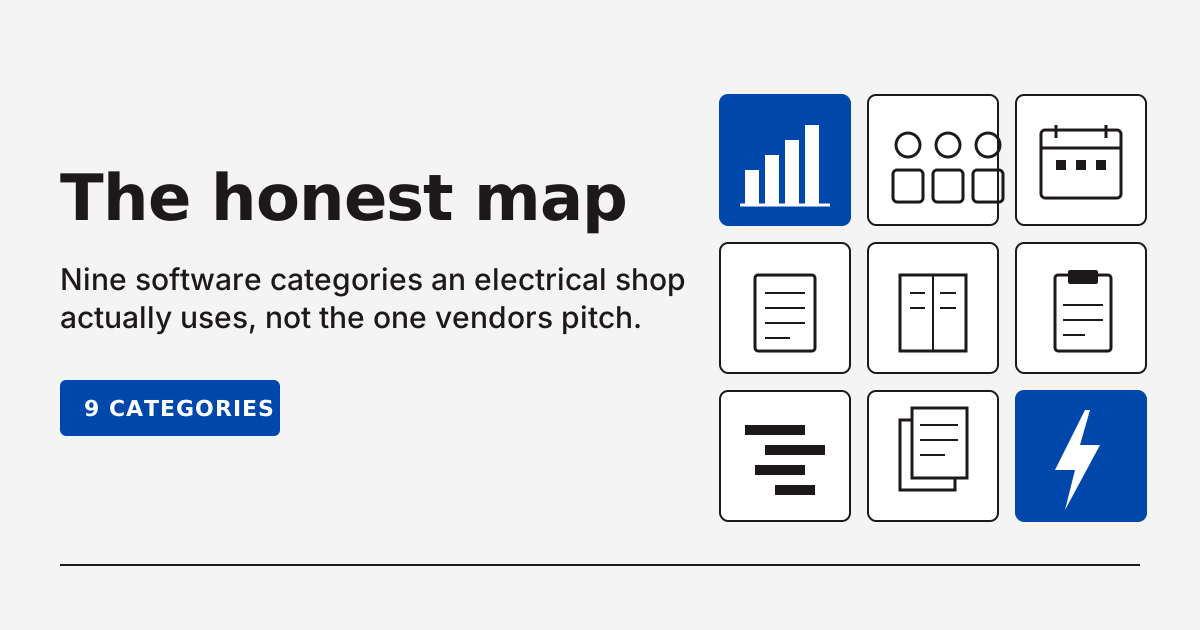
Most "best electrician software" lists are written by vendors who sell one piece of the stack and pretend it's the whole stack. There are roughly nine distinct software categories an electrical shop might buy. Most readers need two or three of them, not the all-in-one ServiceTitan stack everyone gets sold.
We build software for electricians, and we don't sell most of these categories. No CRM, no field service management, no scheduling, no invoicing, no accounting, no estimating, no dispatch, no job management. So here's the neutral map.
A quick disclosure: We build software for electricians in the bench-side category (NEC reference, load calculations, line diagrams). We do not sell CRM, FSM, scheduling, invoicing, accounting, estimating, dispatch, or job-management software. We take no affiliate fees from any vendor in this article. Pricing reflects publicly listed plans as of May 2026 and should be re-verified before purchase.
What is electrician software?
Electrician software is any tool that helps an electrical shop run the business or do the technical work, sorted into roughly nine distinct categories: field service management, CRM, scheduling and dispatch, invoicing, accounting, estimating and takeoff, job management, bidding, and the bench-side tools techs use on jobs (NEC lookup, load calcs, line diagrams). Most articles treat the term as a synonym for field service management. It isn't.
The US has roughly 762,600 working electricians (BLS, May 2023) spread across solo operators, residential shops, commercial service contractors, and industrial subs. Each of those buyer profiles needs a different slice of the stack. A solo guy doing service calls needs invoicing and scheduling, period. A 5-tech residential shop needs FSM. A 20-tech commercial shop needs estimating and dispatch as distinct tools, plus accounting that talks to both.
Here's the split nobody on the SERP draws:
- Back-office software runs the business. Quotes, customer records, dispatch boards, invoices, accounting. This is the category every "best electrician software" list ranks.
- Bench-side software runs the technical work. Load calculations, NEC code lookups, line diagrams, voltage drop. This is the category every back-office list forgets.
Both are real. Most shops need at least one of each. The vendor pages don't say so because they don't sell on the bench side. We do, and we still don't sell most of the back office.
Why does the category you pick first matter?
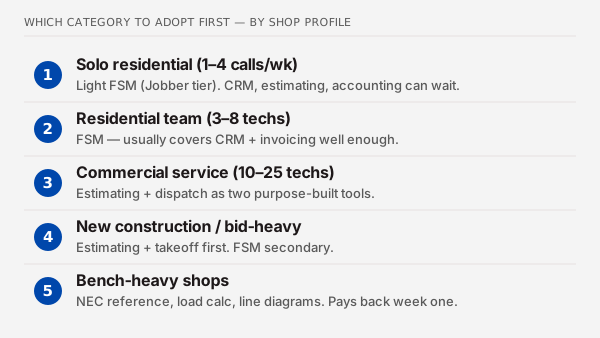
The category you pick first decides whether your software pays back in a month or sits unused for a year. Pick the wrong category and you'll be back on the SERP in six months trying to figure out what went wrong. Pick the right one and the second category you add slots in cleanly. The order matters more than the vendor.
Different shops have different bottlenecks, and the bottleneck dictates the category.
- Solo residential, 1 to 4 service calls a week. Bottleneck is usually invoice turnaround and scheduling. Pick a light FSM (Jobber tier) before anything else. CRM, estimating, and accounting can wait or run from spreadsheets.
- Residential team, 3 to 8 techs. Bottleneck is dispatch and customer history. Pick FSM. The same FSM usually covers CRM and invoicing well enough that you don't need separate tools yet.
- Commercial service, 10 to 25 techs. Bottleneck is usually estimating turnaround and dispatch as separate problems. Pick estimating and dispatch as two purpose-built tools, not one FSM that does both at half quality.
- New construction or bid-heavy shops. Bottleneck is takeoff speed and bid accuracy. Pick estimating and takeoff first. Service work is secondary; FSM is secondary.
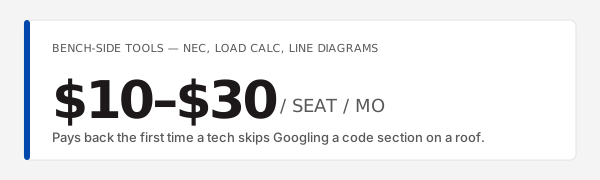
- Bench-heavy shops. Bottleneck is the technical work on each job. Pick NEC reference, load calc, and line-diagram tools. These cost a tenth of what FSM costs and pay back the first time a tech doesn't have to Google a code section on a roof.
When we sat with shop owners across the country, the pattern that came up over and over was this: the second software a shop buys is almost always the one they should have bought first. The first one usually got bought because a sales call happened to land that week.
The point of this guide is to flip that. Pick by bottleneck before the sales call.
What are the 9 categories of electrician software?
There are nine categories worth knowing about. Each one solves a different problem, has a different typical buyer, sits in a different price band, and overlaps with FSM in a specific way. Below is a one-paragraph explainer per category, then a comparison table that puts them side by side. Vendor names are examples, not rankings.
Field service management (FSM): the all-in-one back office
FSM is the catch-all category that covers scheduling, dispatch, mobile work orders, customer history, invoicing, and payments in one platform. It's what most "electrician software" rankings rank. Representative vendors: ServiceTitan, BuildOps, Housecall Pro, Jobber, FieldPulse. Typical price band runs from about $49 a month for a solo Jobber seat to $400 per user per month for ServiceTitan at commercial scale. Most residential shops between 3 and 15 techs land here as their primary purchase. Heavier commercial shops use FSM as the dispatch layer and run estimating separately.
CRM: customer pipeline only
A classic CRM stores contacts, deals, and follow-ups. It doesn't dispatch jobs, doesn't do work orders, doesn't do invoicing in the field. Representative vendors: Nimble, HubSpot, Insightly. Typical price band $25 to $75 per user per month. The honest use case: commercial shops with long bid cycles where field work is already tracked elsewhere. If you searched for "electrician CRM" and landed here, you probably want FSM, not a classic CRM. We wrote a full ranking of CRMs for electrical shops that walks through both options.
Scheduling and dispatching tools
Scheduling tools handle the calendar and route assignment. Dispatching tools handle the live board: who's where, what's running late, what tech to send next. Some shops use the scheduling and dispatch features inside their FSM. Larger shops sometimes run scheduling and dispatch as a purpose-built layer separate from invoicing and CRM. Representative tools: ServiceTitan Dispatch Board, Workiz, Skedulo, plus the scheduling features in Jobber and Housecall Pro. Typical price band $30 to $100 per user per month standalone, or bundled inside FSM. The point is to know whether your bottleneck is scheduling and dispatching tools specifically, or the broader FSM picture. Some larger shops also evaluate dispatch-only software for electrical shops as a standalone layer once the dispatch volume outgrows the FSM board.
Invoicing and payments software
Invoicing software gets a quote out, an invoice in front of the customer, and the payment posted. The category exists separately because some shops have great field operations and a terrible invoice-to-cash cycle. Representative tools: invoicing software for electricians like Joist, Invoice2go, plus the invoicing layer inside every FSM. Typical price band $10 to $50 a month standalone. If invoice turnaround is your only pain and you don't need dispatch, you can solve this for less than the price of dinner.
Accounting platforms
Accounting platforms handle the books: chart of accounts, AR, AP, payroll, sales tax, year-end reporting. Representative vendors: accounting platforms electricians use include QuickBooks Online, Xero, Sage. Typical price band $25 to $200 a month for the platform plus your bookkeeper's time. QuickBooks Online is the default for North American electrical shops by a wide margin. Most FSM tools sync to it two-way; if your candidate FSM doesn't, expect double entry forever. The "is QuickBooks enough?" question gets a clear answer below in the FAQ.
Estimating and takeoff software
Estimating software builds a priced bid from a set of plans. Takeoff software counts the components off those plans. Some tools do both; others do one and integrate to the other. Representative vendors: Accubid, McCormick Estimating, Trimble Accubid, ConEst, plus the lighter electrical estimating software that smaller shops use. Typical price band $50 to $300 per user per month for the lighter tier; commercial-grade Accubid runs higher. Commercial shops over 10 techs almost always run estimating as a separate tool from their FSM because the FSM estimating module is usually not deep enough. If you're trying to shortlist the best electrical estimating software for a commercial shop, that comparison sits in its own writeup, not here.
Job management and project tools
Job management software tracks a single job from sold to closed: schedule, change orders, materials, time entries, photos, sign-offs. Project tools do the same at multi-job or multi-phase scale, often for new construction or commercial fit-outs. Representative vendors: electrical contractor job management software like Knowify, Workiz Projects, Simpro Projects, plus general construction tools like Buildertrend. Typical price band $80 to $300 per user per month. FSM platforms claim job management; the real test is whether they handle change orders, retainage, and progress billing without a workaround.
Bidding software (public-works and commercial)
Bidding software handles the workflow specific to bid jobs: invitations to bid, plan rooms, takeoff coordination, bid forms, GC submissions. Representative tools: iSqFt, ConstructConnect, BuildingConnected, plus the electrical bidding software some shops use alongside their estimator. Typical price band varies wildly, from about $50 a month for a single-user subscription up to several thousand for a plan-room seat. Only relevant if you're chasing public-works or commercial bid work. Residential service shops can skip this category entirely.
Bench-side tools (NEC reference, load calculations, line diagrams): the category every back-office guide forgets
Bench-side tools are the software techs and engineers use on the actual electrical work, not on running the business. Fast NEC code lookups for the truck, NEC Article 220 load calculators for service sizes and panel upgrades, line-diagram and one-line builders for plan-and-permit work. Representative tools: paper codebooks (still), the NFPA NEC app, a few CAD plugins, and the small set of dedicated tools we and other small builders ship in this category. We build the Article 220 load calculator, the NEC code lookup tool, and the line-diagram builder. Typical price band $10 to $30 per seat per month. No top-10 result on the "electrician software" SERP mentions this category, which is exactly why we wrote this section.
Category comparison table
| Category | Problem solved | Typical buyer | Typical price band | Overlaps with FSM? | Representative vendors |
|---|---|---|---|---|---|
| Field service management | One platform for dispatch, invoicing, customer history | Residential, 3–15 techs | $49–$400/user/mo | Yes (it is FSM) | ServiceTitan, Housecall Pro, Jobber, BuildOps, FieldPulse |
| Classic CRM | Sales pipeline only | Commercial bid shops with field tracked elsewhere | $25–$75/user/mo | Partial (CRM features in FSM) | Nimble, HubSpot, Insightly |
| Scheduling and dispatch | Live calendar and dispatch board | Mid-size shops with dispatch as bottleneck | $30–$100/user/mo standalone | High (overlap inside FSM) | Workiz, Skedulo, Dispatch boards inside FSM |
| Invoicing and payments | Quote-to-cash speed | Solo and small shops with paper invoices | $10–$50/mo | High (FSM invoicing) | Joist, Invoice2go, FSM invoicing |
| Accounting | Books, payroll, sales tax | Every shop | $25–$200/mo | No (FSM syncs to it) | QuickBooks Online, Xero, Sage |
| Estimating and takeoff | Priced bid from plans | Commercial shops, 5+ techs | $50–$300/user/mo | Partial (FSM modules are light) | Accubid, McCormick, ConEst |
| Job management | Single-job tracking, change orders | Project-heavy shops | $80–$300/user/mo | Partial (FSM project modules) | Knowify, Simpro, Buildertrend |
| Bidding software | Bid workflow and plan rooms | Public-works and commercial subs | $50–$3,000+ | No | iSqFt, ConstructConnect, BuildingConnected |
| Bench-side tools | NEC lookups, load calcs, line diagrams | Every working electrician | $10–$30/seat/mo | No | NFPA NEC app, Breakerbox tools, CAD plugins |
The category-by-category links above point to deeper writeups when those exist. The categories listed without a deeper writeup are on our calendar.
All-in-one vs best-of-breed: when does each win?
All-in-one (one FSM that claims to do CRM, scheduling, invoicing, and estimating) usually wins above about 10 techs because data integration starts paying back at scale. Best-of-breed (two or three purpose-built tools wired together) usually wins below 5 techs because each tool costs less, sets up faster, and rarely needs the data integration that all-in-one is selling you on.
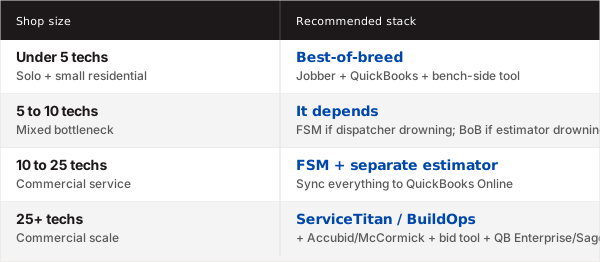
Here's the honest test we walk shop owners through:
- Under 5 techs. Buy best-of-breed. Jobber plus QuickBooks plus a bench-side tool is the default sub-5-tech stack. It costs less than a single ServiceTitan seat. Setup takes a weekend, not a quarter.
- 5 to 10 techs. It depends. If your dispatcher is drowning, lean FSM. If your estimator is drowning, keep best-of-breed and add purpose-built estimating.
- 10 to 25 techs. Buy FSM as your dispatch and customer-record layer. Add purpose-built estimating because no FSM estimating module is competitive at that scale. Sync everything to QuickBooks Online.
- 25+ techs. Buy ServiceTitan or BuildOps for FSM, run a separate estimator (Accubid or McCormick), run a separate bid tool if you chase public works, sync accounting through QuickBooks Enterprise or move to Sage.
The pitch you'll hear from every FSM vendor is that their platform covers all of this. The pitch from every estimating vendor is that the FSM estimating module is a toy and you need a real estimator. Both are partly right. The size of your shop decides which side is more right.
If you're shopping for a packaged buyer's guide that scores specific tools across categories, like an electrician business-software roundup or a broader electrical contractor software roundup that ranks the all-in-one platforms head to head, that's a different article. We're working on one.
Which category do you need first? (Decision flow)
Run these five questions in order. Whichever question your bottleneck shows up in, that's the category to buy first.
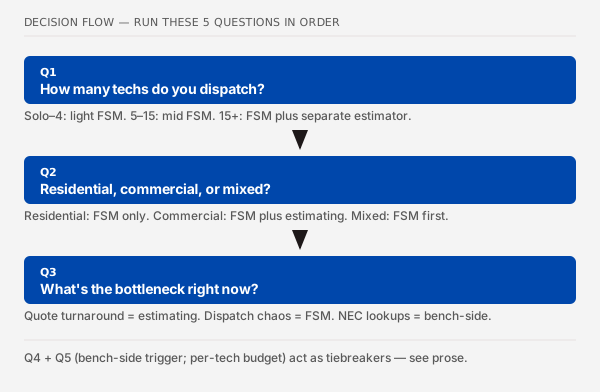
How many techs do you dispatch? Solo or 2 to 4, pick light FSM (Jobber tier). 5 to 15, pick mid FSM (Housecall Pro, FieldPulse). 15+, keep going. You'll likely run FSM plus a separate estimator.
Residential, commercial, or mixed? Residential, FSM covers most of what you need. Commercial, expect to run FSM and estimating as separate tools. Mixed, pick FSM first and add estimating when your bid backlog starts costing you jobs.
What's the bottleneck right now? Quote turnaround points to estimating software. Dispatch chaos points to FSM or scheduling and dispatching tools. Invoice collection points to invoicing software for electricians. Customer records scattered points to FSM or CRM. Books out of date points to accounting platforms electricians use. On-the-job code lookups eating Google time points to bench-side tools.
Are your techs spending real time looking up NEC codes or recalculating loads on every job? If yes, buy bench-side tools first. They're the cheapest software you'll ever buy, they pay back the first week, and they don't require any change to your office process. If no, skip the bench-side category for now.
What's your monthly software budget per tech? Under $50: best-of-breed (Jobber, QuickBooks, bench-side tools). $50 to $200: mid FSM, plus QuickBooks, plus bench-side. $200+: full FSM (ServiceTitan, BuildOps), separate estimator, full accounting.
The path through these five questions almost always lands a shop on the same two categories: FSM (or invoicing if you're solo) plus bench-side tools. The other categories follow only when the bottleneck shifts.
Most shops, the answer to question 1 plus question 3 tells you everything. The other three questions are tiebreakers.
What do real electricians actually use?
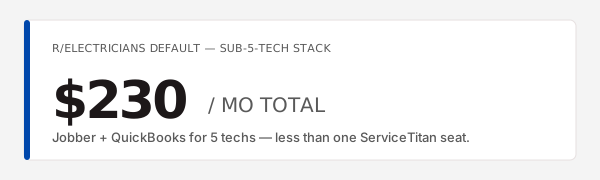
Read any r/electricians thread on software and you'll see the same patterns repeated. The Jobber-plus-QuickBooks stack shows up as the default for sub-5-tech shops. ServiceTitan adoption drops off a cliff under 10 techs. Estimators on commercial jobs run McCormick or Accubid separately from whatever their FSM is. Adoption beats features, every time.
A few patterns that come up over and over in forum discussions and the conversations we have with shop owners:
- "ServiceTitan is too heavy under 10 techs." This is the single most repeated comment. The platform is built for commercial scale; small shops describe spending weeks in onboarding, then watching techs avoid the mobile app because it has too many screens.
- "Jobber plus QuickBooks is the default sub-5-tech stack." It shows up in nearly every "what do you use?" thread. It's not an outlier, it's the baseline. The two tools together cost less than a single ServiceTitan seat.
- "Estimators run their own software." Commercial-shop estimators almost always run McCormick, Accubid, or ConEst on a separate machine from whatever FSM the rest of the shop uses. The FSM estimating module rarely covers commercial-grade takeoff.
- "Adoption beats features." The CRM, FSM, or estimator your senior people will actually open every day is the right one. The one that won on a feature comparison sheet but sits unused is worthless. Multiple shop owners told us the same story: they bought the best tool on paper, watched it gather dust, then bought the second-best tool and saw immediate use.
- "Bench tools nobody asks about." A recurring side comment in those threads is techs asking what software other techs use for NEC lookups or load calcs. The answers are usually the codebook plus Google. This is the gap we built into.
The takeaway: the trade-forum consensus on category-level choices is more honest than any vendor ranking. Read three r/electricians threads before you read any "best of" article, this one included.
How does pricing compare across categories?
Across the nine categories, the bottom-to-top spread is roughly 16x for a 5-tech shop. The cheapest category (bench-side tools at $10 to $30 per seat per month) costs less per month than the highest category (commercial FSM at $200 to $400 per user per month) costs per user per day. Your category decision sets your budget, not your vendor decision.
Here's the per-category band for a 5-tech shop:
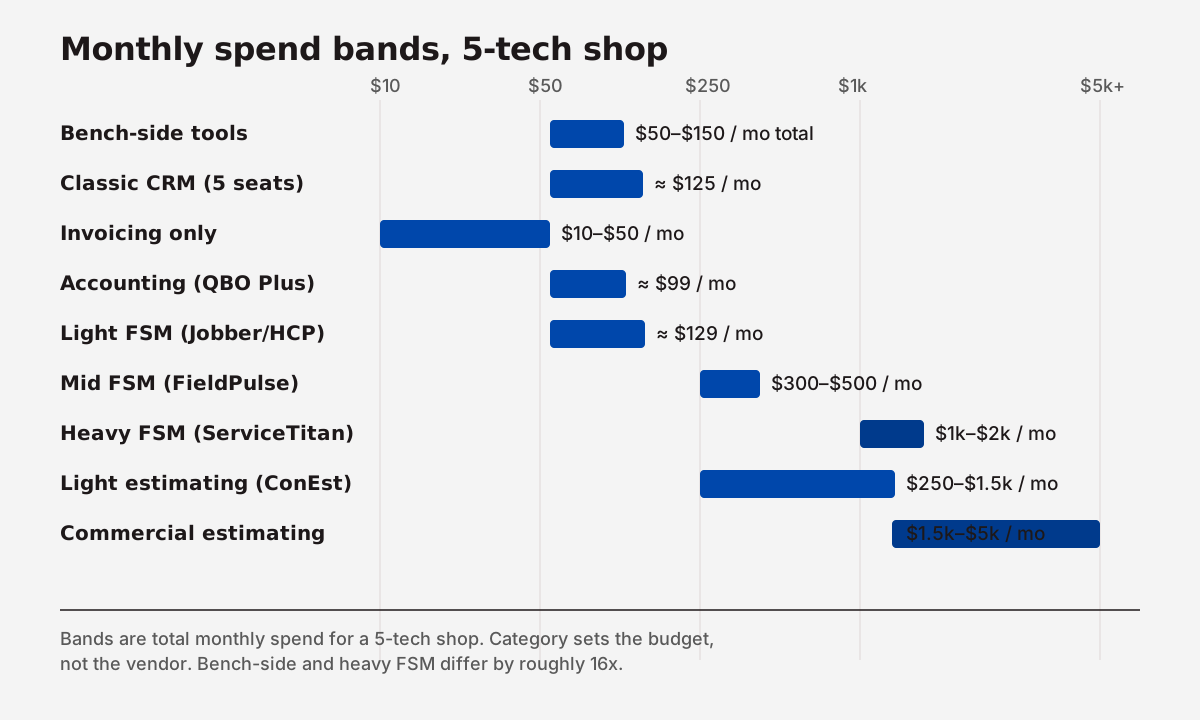
- Bench-side tools: $50 to $150 a month total (the whole shop, not per user)
- Classic CRM: $125 a month (5 seats of Nimble)
- Invoicing-only: $10 to $50 a month
- Accounting (QuickBooks Online Plus): $99 a month
- Light FSM (Jobber Connect or Housecall Pro Essentials): $129 a month
- Mid FSM (FieldPulse, Kickserv Business): $300 to $500 a month
- Heavy FSM (ServiceTitan, BuildOps): $1,000 to $2,000 a month
- Estimating (light, like ConEst or the smaller tier of Accubid): $250 to $1,500 a month
- Estimating (commercial-grade Accubid, McCormick): $1,500 to $5,000 a month
Capterra's category averages line up with these bands (Capterra, field service management software category and adjacent CRM and accounting category pages). The directional point: budget is set by the category you pick, not the specific vendor inside it. A bad call on category costs you 10x more than a bad call on vendor inside the right category.
What about bench-side software?
Bench-side software is the category every back-office guide forgets, and it's the one category most working electricians wish someone had ranked when they were on the SERP. Fast NEC code lookup, NEC 220 load calculator, line-diagram builder, voltage drop. These tools sit on the truck, not in the office.
Here's why they don't show up in any "best electrician software" listicle. The listicles are written by FSM and CRM vendors. FSM and CRM vendors don't sell bench-side tools, so the bench-side category gets cut from the article. The gap is real and it's structural, not editorial.
So here's the honest map of what's in this category, including our own products.
- NEC code lookup. A searchable, plain-language reference to the 2023 NEC that a tech can pull up on a phone in a basement. The NFPA NEC app is the official option. Our NEC code lookup tool is the one we built because the NFPA app doesn't answer "what does 250.122 say in plain English" fast enough for a tech on a roof.
- NEC Article 220 load calculator. A real load calc, not a spreadsheet. Service size, panel upgrade, EV charger, heat pump. We built our Article 220 load calculator to replace the Excel template that 90% of shops are still using. The Excel template gets the answer mostly right; it gets the audit trail wrong, every time.
- Line-diagram and one-line builders. For permit packages and plan-and-permit residential, a tech needs to build a clean single-line in five minutes, not five hours in CAD. Our line-diagram builder is the one we built. AutoCAD, Visio, and a few specialty tools cover the heavier end of this. Smaller permit work usually wants the lighter tools.
- The codebook itself. Still the most-used bench-side tool in the trade. Paper or PDF. Don't underestimate how many shops still run on a codebook and a calculator. The bench-side software market exists because the codebook is slow.
There's a sister category here too: electrician apps including bench-side tools, which we'll cover as a separate cross-cutting article.
Full disclosure: we sell in this category. We don't sell in any of the other eight. That's the whole reason this article is structured the way it is. We can map the back-office honestly because we don't have a horse in those races.
Frequently asked questions
What is electrician software?
Electrician software is any tool an electrical shop uses to run the business or do the technical work, spanning roughly nine categories: field service management, CRM, scheduling and dispatch, invoicing, accounting, estimating and takeoff, job management, bidding, and bench-side tools (NEC lookup, load calcs, line diagrams). The US has about 762,600 working electricians (BLS, May 2023), and most shops use two to three of these categories at any one time.
What software do electricians use?
Most small residential electrical shops use a field service management tool like Jobber or Housecall Pro plus QuickBooks Online for accounting, plus a bench-side tool or two for NEC lookups and load calculations. Commercial shops add estimating software (Accubid or McCormick) and sometimes a bid tool like iSqFt. The Jobber-plus-QuickBooks combination is the default sub-5-tech stack, repeatedly cited in r/electricians threads.
How much does electrician software cost?
Electrician software ranges from about $10 a month for bench-side tools to over $400 per user per month for enterprise FSM like ServiceTitan (Capterra category averages put trade FSM in the $50 to $200 per user per month band). The category decision sets the budget. A 5-tech residential shop on Jobber and QuickBooks runs $230 a month total; the same shop on ServiceTitan would run roughly $1,500 a month.
What is the difference between electrician software and field service management?
Field service management is one category inside the broader electrician-software map. FSM platforms (ServiceTitan, Housecall Pro, Jobber, BuildOps) cover dispatch, customer history, invoicing, and payments in one tool. Electrician software as a category also includes classic CRM, accounting, estimating and takeoff, job management, bidding, and bench-side tools (load calcs, NEC reference, line diagrams). Most rankings conflate the two; they aren't the same.
Do small electricians need software?
Solo electricians doing fewer than four service calls a week can usually run on a phone and a spreadsheet. Above that, the math turns against you fast. A 3-tech shop typically loses four to six hours per tech per week to admin without software, which is one full job's worth of billable time per tech per week. At that point a $49-a-month Jobber subscription pays back in the first week.
Is QuickBooks enough for an electrician?
QuickBooks is enough for the accounting and bookkeeping side of an electrical business, but it doesn't dispatch, doesn't do mobile work orders, and doesn't handle field invoicing or photo capture. Most shops with three or more techs pair QuickBooks Online with a field service management tool that syncs to it two-way. The combination, not QuickBooks alone, is what most working electrical shops actually run.
Self-contained answer: QuickBooks handles the books. It does not dispatch, take mobile work orders, or invoice in the field. The standard electrical-shop stack is QuickBooks Online plus an FSM (Jobber, Housecall Pro, or ServiceTitan) that syncs to it two-way.
What features should electrician software have?
The features that matter most depend on the category. For FSM: mobile-first app, dispatch, work orders with photo capture, customer history, in-field invoicing, QuickBooks integration, transparent pricing. For estimating: takeoff speed, assembly libraries, pricing updates, integration to the FSM or accounting. For bench-side tools: fast NEC lookups, accurate load calcs, clean line-diagram exports for permit packages. The "features" list always trails the "category" question.
What to do next
Three steps that work regardless of which category you end up buying first.
- Identify your bottleneck. Quote turnaround, dispatch chaos, invoice collection, customer records, books, or on-the-job code lookups. One of those costs you more than the others. Name it first.
- Pick the category that fixes that bottleneck. Not the all-in-one. Not the platform a sales rep called you about last week. The category, by name, that addresses the bottleneck you just named.
- Trial two tools in that category before committing. The free trial is not optional. The tool that wins on paper is rarely the one your senior people will open on Monday morning. Adoption beats features.
Whichever category you pick first, your techs are still going to be on the roof, in the crawl space, and in the panel doing the actual electrical work. That's the part we build for. Breakerbox is the bench-side software for electricians: load calcs, NEC lookup, line diagrams. We don't sell CRM, FSM, scheduling, invoicing, accounting, estimating, dispatch, or job-management software. That's the whole point of this map.
Last updated: 22 May 2026.