
TL;DR: Electrician scheduling software splits into three categories: calendar-first (Setmore, FieldVibe), dispatch-first (Workiz, Housecall Pro, Jobber, FieldPulse), and FSM-bundled (ServiceTitan, BuildOps, FieldEdge). Verified June 2026 pricing runs $0 to $398+/user/month (vendor sales-call quotes, 2026-06). For most 1 to 15-person residential shops, a dispatch-first tool at $50 to $150/user/month is the right altitude.
Every top-10 result for "electrician scheduling software" is written by a vendor selling into the category. ServiceTitan ranks their own blog. Workiz ranks Workiz. Housecall Pro ranks Housecall Pro. Nobody on page one is a neutral buyer. That's the problem. A 1 to 15-tech residential shop owner sitting down to pick a scheduling tool gets nine vendor pages, zero buyer voices, and no honest framing of what they're choosing between.

I run independent software-buying research for residential electrical shops, and I have no horse in the scheduling race — no CRM, no FSM, no dispatch board, no calendar app to sell. So here's the neutral map a residential shop owner can use to pick.
A quick disclosure: I write software-buying research for residential electrical shops. Breakerbox, the publisher, builds bench-side tools for electricians (NEC reference, load calculations, line diagrams) and does not sell scheduling, dispatch, CRM, or FSM software. No affiliate fees from any vendor in this article. Pricing was verified on vendor sales calls and public pricing pages in June 2026. Refresh quarterly before buying.
What is electrician scheduling software, really?
Electrician scheduling software is any tool that puts jobs on a calendar, assigns techs to those jobs, and pushes the schedule to a phone in the truck. That's it. It is not a CRM. It is not a code-lookup tool. It is not accounting. Most of the platforms ranked on page one bundle all four, which is where the buyer confusion starts.
Roughly 762,600 electricians work in the US (BLS, May 2023). The ones reading this guide are mostly in residential service shops between 1 and 15 techs. At that size the scheduling problem is real but bounded: a handful of techs, a daily call volume between 5 and 40 jobs, a mix of booked appointments and same-day urgent calls, and an owner or office manager doing the dispatching.
Self-contained answer: Electrician scheduling software puts jobs on a calendar, assigns techs, and pushes the schedule to mobile. It splits into three categories by feature density: calendar-first ($0 to $30/user/month), dispatch-first ($50 to $150/user/month), and FSM-bundled ($150 to $400+/user/month). Residential shops between 3 and 15 techs almost always fit dispatch-first. Solo shops fit calendar-first. Shops past 15 techs may fit FSM-bundled.
The CRM side, the quote-to-job side, sits in a different category. I covered that in the 8 best CRMs for electricians comparison. The scheduling tool gets the truck to the door. The CRM tracks whether the lead became a customer in the first place. Different problems, different software.
What are the three categories of electrician scheduling software?
The market splits into three categories nobody on page one names. Calendar-first tools are booking apps with a calendar grid. Dispatch-first tools add a drag-and-drop dispatch board, GPS tracking, and a mobile tech app. FSM-bundled suites add accounting, CRM, inventory, and price books on top, at three to five times the cost.
Most "best electrician scheduling software" lists mix all three into one ranked list. That's the wrong shape. A 1-truck shop buying ServiceTitan is paying for features it will never touch. A 12-tech shop buying Setmore will outgrow it in six months. The category, not the brand, is the first decision.
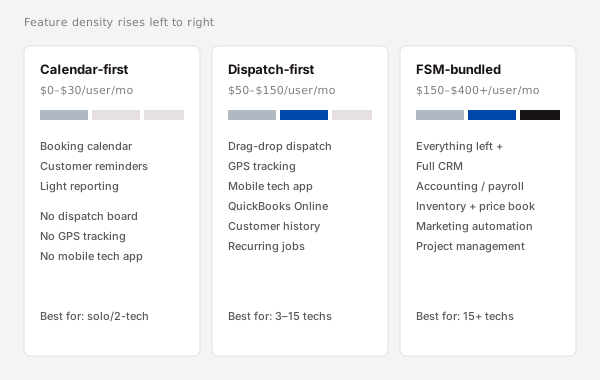
Here's the split:
- Calendar-first. Setmore, FieldVibe, Square Appointments. Booking calendar, customer reminders, light reporting. No real dispatch board, no GPS, weak QuickBooks sync. $0 to $30/user/month. Best for solo or 2-person residential shops.
- Dispatch-first. Workiz, Housecall Pro, Jobber, FieldPulse. Drag-and-drop dispatch board, GPS tracking, mobile tech app, QuickBooks Online sync, customer history, recurring jobs. $50 to $150/user/month. Best for 3 to 15-tech residential shops with a dispatcher or office manager.
- FSM-bundled. ServiceTitan, BuildOps, FieldEdge, Service Fusion. Everything in dispatch-first plus a real CRM, accounting, inventory, price book, marketing automation, payroll integration. $150 to $400+/user/month. Best for shops past 15 techs or commercial-heavy operations.
The taxonomy is the spine of the rest of this guide. Each category gets its own section below with the named tools, real prices, and the shop profile it fits.
When is a calendar-first tool ($0 to $30/user/month) enough?
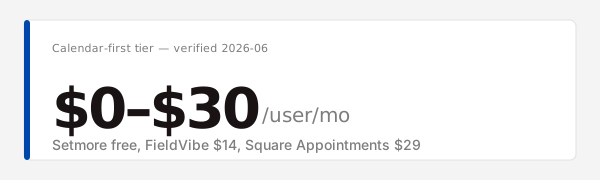
A calendar-first tool is enough when one person does all the dispatching, the job volume is under 10 calls a week, and most work is booked appointments rather than same-day urgent calls. Setmore's free tier and FieldVibe's $14/user/month plan both work at that altitude (Setmore pricing, 2026-06; FieldVibe pricing, 2026-06). Past that volume, the dispatch board becomes the bottleneck.
Tools in this category:
- Setmore. Free tier (1 user, 100 appointments/month), $5/user/month for unlimited appointments, $9/user/month for the team plan with payment processing. Booking calendar, automated customer reminders, Square or Stripe payments. No dispatch board, no GPS, no QuickBooks sync on the free tier.
- FieldVibe. Free for 1 user, $14/user/month for 2+ users on the Pro plan. Built specifically for field service, so it has crew scheduling, customer notes, and basic job photos. Still no real dispatch board.
- Square Appointments. Free for 1 user, $29/user/month for teams. Strong if you already run Square for payments. Generic small-business booking, not electrical-specific.
The hard ceiling: the first time a tech is on a roof and an emergency call comes in, the dispatcher has to either bump a booked job or send the next available tech. A calendar grid doesn't show you who's closest, who's free, or what their truck is stocked with. A real dispatch board does. When that scenario happens twice in a week, the calendar-first tool is the wrong tool. Most shops cross that line between 3 and 5 techs.
Why are dispatch-first tools the sweet spot for residential shops?
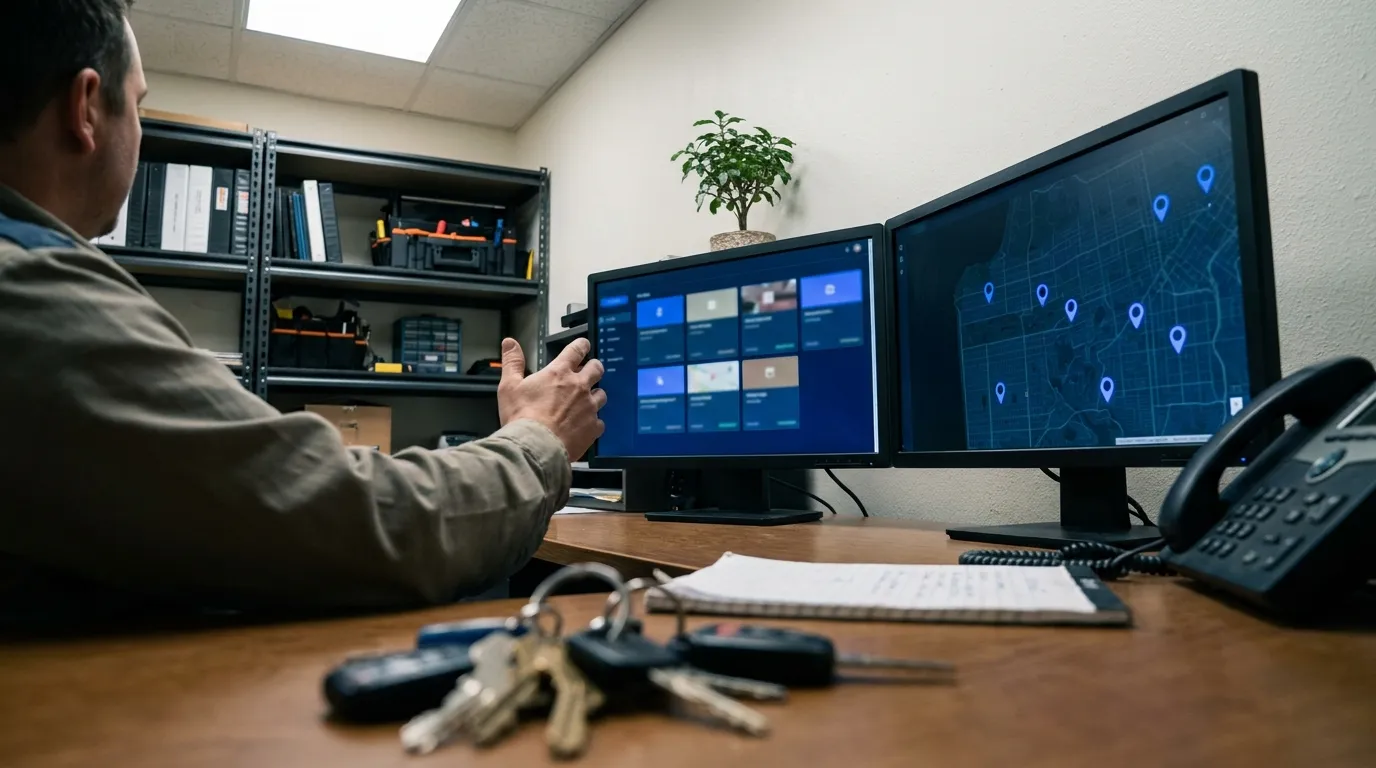
Dispatch-first tools are the sweet spot of the electrician scheduling software market because residential service work is roughly 30 to 50 percent same-day urgent calls, and that mix breaks a plain calendar. Workiz, Housecall Pro, Jobber, and FieldPulse all give you a drag-and-drop dispatch board, GPS truck tracking, a mobile tech app, and QuickBooks Online sync at $50 to $150/user/month verified June 2026 (Workiz pricing, 2026-06; Jobber pricing, 2026-06; Housecall Pro pricing, 2026-06). That's the right altitude for 3 to 15-tech shops.
Tools in this category:
- Workiz. Starter at $65/user/month, Team at $99/user/month, Professional at $159/user/month. Strongest mobile tech app of the four. Built-in two-way SMS, call recording, and online booking. QuickBooks Online sync on Team and up.
- Housecall Pro. Basic at $79/month flat for 1 user, Essentials at $189/month for up to 5 users (works out to roughly $38/user/month at full seats), Max at custom pricing. Strong consumer-facing booking widget and homeowner reminders. QuickBooks Online sync across all tiers.
- Jobber. Core at $69/month for 1 user, Connect at $169/month for up to 7 users, Grow at $349/month for up to 15 users. The most established interface; lowest learning curve. Quotes and invoicing are tightly integrated. QuickBooks Online sync on Connect and up.
- FieldPulse. Starter at $79/user/month, Pro at $99/user/month. Newer entrant. Strong dispatch board and lighter on the marketing-automation features, which keeps the price down for shops that don't need them.
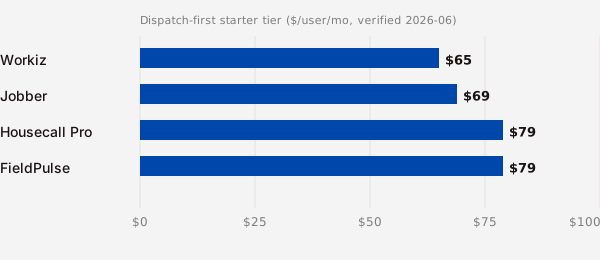
What separates them in practice. Workiz is the strongest pure dispatch board. Housecall Pro wins on homeowner-facing features (booking widget, branded reminders, follow-ups). Jobber is the easiest to learn for an office manager who came from spreadsheets. FieldPulse is the cheapest entry point and ships fast on new features but has the smallest install base of the four. None of them is the wrong choice for a residential shop in this size band. The differences show up in week two of the trial, not on the feature comparison page.
A dispatch-first tool also covers the back-office basics other electrician business software categories handle separately: scheduling, dispatch, invoicing, customer history, and QuickBooks sync in one platform. You do not need a separate CRM at this stage.
Are FSM-bundled suites worth the price for residential shops under 15 techs?
FSM-bundled suites are not worth the price for residential shops under 15 techs, because the features that justify the premium over standard electrician scheduling software (real inventory management, marketing automation, multi-location accounting, deep price books) get used by commercial and large residential operations, not by 5-truck shops. ServiceTitan quoted $398/user/month on a sales call in June 2026 for the Starter tier with a 12-month contract (ServiceTitan sales call, 2026-06). That is roughly four times what Workiz or Jobber costs for the same shop.
Tools in this category:
- ServiceTitan. Starter at $398/user/month verified June 2026, with custom pricing on Essentials and Pro tiers. The dominant enterprise FSM. Best fit for residential shops past 20 techs or any shop with a heavy commercial mix.
- BuildOps. Custom pricing; demos quote $250+/user/month for residential service tiers. Strong on commercial service and project-based work. Built newer than ServiceTitan, so the interface is cleaner.
- FieldEdge. $150 to $200/user/month range depending on tier. The cheapest of the FSM-bundled set. Strong QuickBooks Desktop sync, which still matters for shops that haven't moved to Online.
- Service Fusion. Starter at $192/user/month, Plus at $298/user/month, Pro at $392/user/month. Mid-market FSM with a long install base in HVAC and electrical.
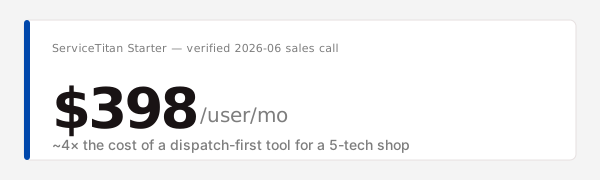
The honest take. A 5-tech residential shop running on ServiceTitan is paying for the inventory module, the marketing automation, and the project-management features it will never touch. The same shop on Workiz at $99/user/month gets the dispatch board, the mobile app, the QuickBooks sync, and the customer history it uses every day. Across five techs and twelve months, that is roughly $17,940 versus $5,940. The $12,000 delta buys you features you won't open. Past 15 techs the math starts to flip, because the inventory and accounting features start earning their keep. Under 15 techs it almost never does.
What does electrician scheduling software cost per tech per month in 2026?
Verified June 2026 pricing runs from $0 on Setmore's free tier to $398/user/month on ServiceTitan's Starter tier, with most dispatch-first tools clustering between $65 and $99/user/month (vendor pricing pages and sales-call quotes, 2026-06). The table below is what each vendor quoted publicly or by sales call in June 2026, normalized to a per-user-per-month number where the vendor sells flat-rate plans.
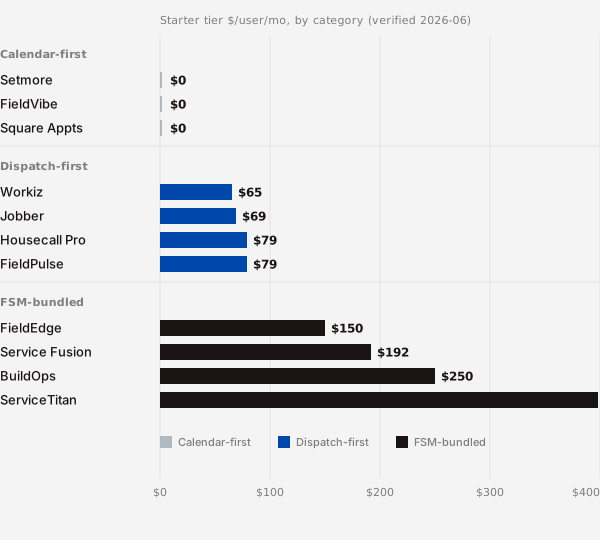
| Category | Tool | Starter tier | Per-user/month equivalent | What's included | What triggers an upgrade |
|---|---|---|---|---|---|
| Calendar-first | Setmore | $0 (free tier) | $0 | 1 user, 100 appointments/month, basic reminders | More than 1 user or 100 bookings/month |
| Calendar-first | FieldVibe | Free for 1 user | $0 | Solo booking, basic notes | Adding a second user ($14/user/mo) |
| Calendar-first | Square Appointments | Free for 1 user | $0 | Square payment integration | Team plan ($29/user/mo) |
| Dispatch-first | Workiz | Starter $65/user/mo | $65 | Dispatch board, mobile app, SMS | QuickBooks Online sync (Team tier, $99) |
| Dispatch-first | Housecall Pro | Basic $79/mo (1 user) | $79 | Dispatch, QuickBooks Online sync | Adding users (Essentials, $189/mo for 5) |
| Dispatch-first | Jobber | Core $69/mo (1 user) | $69 | Quotes, invoicing, scheduling | Adding users (Connect, $169/mo for 7) |
| Dispatch-first | FieldPulse | Starter $79/user/mo | $79 | Dispatch, mobile app | Pro features ($99/user/mo) |
| FSM-bundled | FieldEdge | ~$150/user/mo | $150 | Full FSM, QuickBooks Desktop sync | Inventory, payroll modules |
| FSM-bundled | Service Fusion | Starter $192/user/mo | $192 | Full FSM, basic inventory | Project management (Plus, $298) |
| FSM-bundled | ServiceTitan | Starter $398/user/mo | $398 | Full FSM, marketing, inventory | Essentials and Pro tiers (custom) |
Pricing verified 2026-06. Refresh quarterly before buying. Vendor pricing pages change without notice and sales-call quotes often shift with contract length and seat count. The numbers above were captured June 2026 from public pages or direct sales calls.
What vendors quote vs what shops report. The "starts at $X" headline on a vendor pricing page almost always assumes annual billing, a minimum seat count, and the base tier. Real shops pay 15 to 30 percent more after they add the features they need (QuickBooks sync, online booking, more users). Budget for the next tier up from whatever the headline says, and you'll be closer.
How do you choose electrician scheduling software in 6 questions?
You choose by answering six questions that route you to a category, then picking the tool inside that category that fits your specific workflow. The questions are ordered by how much they narrow the field. Question 1 alone eliminates two-thirds of the market for most shops.
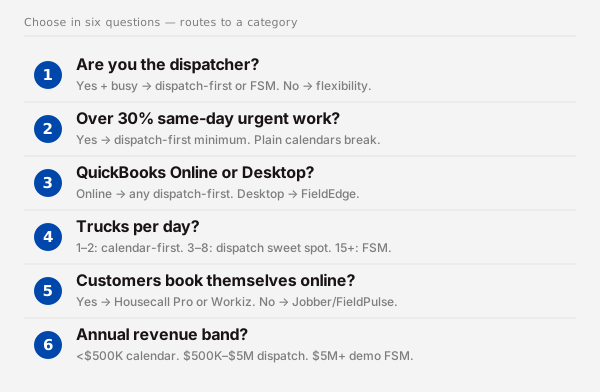
- Do you have a dispatcher, or are you the dispatcher? If you are the dispatcher and you have other jobs to do, you need a tool that does work for you (real dispatch board, automated reminders, GPS). That is dispatch-first or FSM-bundled. If you have a dedicated dispatcher and the volume to keep them busy, you have more flexibility on tool choice.
- Is more than 30 percent of your work same-day urgent? If yes, a plain calendar will not survive contact with the week. You need a drag-and-drop board to reshuffle on the fly. Dispatch-first minimum.
- Does QuickBooks Online or Desktop run your books? If QuickBooks Online, every dispatch-first tool syncs. If Desktop, FieldEdge has the cleanest sync; most others require a manual export. This question alone often picks the tool.
- How many trucks roll on a typical day? 1 to 2 trucks: calendar-first works. 3 to 8 trucks: dispatch-first sweet spot. 9 to 15 trucks: dispatch-first still works but you'll feel the seams. 15+: FSM-bundled starts to earn its price.
- Do customers book themselves online, or do you book them? If you want online booking visible to homeowners (booking widget on your site, SMS confirmations, follow-up emails), Housecall Pro and Workiz are the strongest. If you book everyone yourself, Jobber and FieldPulse are simpler and cheaper.
- What's your annual revenue range? Under $500K: calendar-first or the cheapest dispatch-first tier. $500K to $2M: dispatch-first sweet spot. $2M to $5M: dispatch-first still fits unless commercial mix is high. $5M+: time to demo FSM-bundled.
Answer the six. Most residential shops between 3 and 12 techs land on the same two-tool shortlist: Workiz or Jobber. The QuickBooks question and the online-booking question usually break the tie.
When is scheduling software the wrong call?
Scheduling software is the wrong call when the bottleneck in your shop is not really scheduling. Most of the time the owner thinks scheduling is the problem because the calendar feels chaotic, but the real issue is somewhere else in the stack. Roughly 49 percent of small US contractors still run their books and operations on spreadsheets or pen-and-paper (JBKnowledge ConTech Report, 2023) — a real chunk of that population sees a chaotic calendar and assumes electrician scheduling software is the fix, when the underlying gap is somewhere else entirely. Below are the four most common cases where buying a scheduling tool will not move the needle.

- You're solo and run under 10 calls a week. A paid calendar buys you nothing over Google Calendar plus a shared spreadsheet. The dispatch board is empty. The mobile app is duplicate of your phone calendar. Save the $65/month and put it toward truck parts.
- Your real bottleneck is quote-to-job conversion. If leads are coming in but not closing, scheduling is not the problem. The lead-to-quote pipeline is. That is a CRM problem, not a scheduling problem. I covered the CRM side in the quote-to-job conversion in an electrician CRM guide.
- You can't keep techs busy. Scheduling software will not generate demand. If the calendar has gaps because the phone isn't ringing, the answer is marketing, lead generation, or geographic expansion, not a $99/user/month dispatch board on top of an empty schedule.
- Your office manager already runs a whiteboard well. A whiteboard with magnetic name strips for 5 trucks and 25 calls a day works. The migration cost (training, data entry, customer history rebuild) often exceeds the dispatch-board gain. If it's working, leave it for another six months and revisit when you hit 8 trucks.
The contrarian point: buying scheduling software is often the cargo-cult fix for a problem that lives somewhere else in the business. Diagnose first.
What does scheduling software not solve for an electrician?
Scheduling software gets the truck to the door. The work that happens after the truck arrives is a different stack. The four jobs scheduling tools do not do are the calculations, the code lookups, the diagrams, and the books. A residential service electrician needs each of those, and none of them lives in Workiz or Housecall Pro.
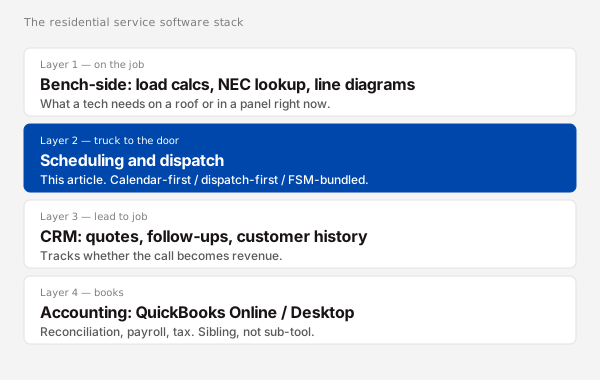
- Load calculations for service upgrades. When a customer asks about adding an EV charger or a heat pump, somebody has to run the load math. Scheduling tools do not do this. A dedicated residential load calculator does.
- NEC code lookup on the job. A tech on a roof needs an answer about 310.12 ampacity or 625 EV-charger requirements right now, not after driving back to the shop. Dispatch boards do not carry the codebook. A code lookup tool does.
- Quote-to-job conversion with proper line items. Some dispatch-first tools have light invoicing, but full quote-to-job conversion (line-item estimates, optional upgrades, customer signatures, deposit handling) is a CRM-or-FSM job, not a scheduling job.
- Accounting reconciliation. QuickBooks does this. Every dispatch-first tool above syncs to QuickBooks Online; none of them replace it. Budget for QuickBooks as a separate line item.
The frame: scheduling software gets the truck to the door. The work that happens after the truck arrives is a different stack. Picking the right scheduling tool is one decision in a stack of four or five, not the whole stack.
Frequently asked questions
What is the best scheduling software for electricians?
The question is wrong-shaped. There is no single best tool because the right tool depends on shop size, dispatcher setup, and revenue band. For a 3 to 15-tech residential shop, Workiz, Housecall Pro, Jobber, or FieldPulse will all fit at $65 to $99/user/month verified June 2026 (dispatch-first vendor pricing, 2026-06). Pick by QuickBooks sync and online-booking needs, not by the leaderboard.
Is there free scheduling software for electricians?
Yes. Setmore offers a free tier (1 user, 100 appointments/month) and FieldVibe is free for 1 user (Setmore pricing, 2026-06). Square Appointments is also free for 1 user. The hard limit on all three is that they cap at 1 user and offer no real dispatch board, so they fit solo electricians but break at 2+ techs running same-day urgent calls.
What is the difference between scheduling software and dispatch software?
Scheduling software puts jobs on a calendar in advance. Dispatch software lets you reshuffle that calendar in real time as new calls come in and techs run long. Pure scheduling tools (Setmore, FieldVibe) handle booked work well. Pure dispatch tools (the dispatch-first category) handle same-day urgent calls well. Most residential shops need both, which is why dispatch-first tools at $65 to $99/user/month dominate the category.
Does electrician scheduling software work for solo electricians?
Yes. Solo electricians running under 10 calls a week fit calendar-first tools (Setmore free tier, FieldVibe free, Square Appointments free) (Setmore pricing, 2026-06). The dispatch board features in dispatch-first tools sit unused at solo volume. The $0 to $14/user/month band is the right altitude. Past 10 calls a week, or once a second tech joins, dispatch-first becomes the right call.
How much does electrician scheduling software cost in 2026?
Verified June 2026 pricing runs $0 to $398/user/month. Calendar-first tools are $0 to $30/user/month, dispatch-first tools are $50 to $150/user/month, FSM-bundled suites are $150 to $400+/user/month (vendor pricing pages and sales-call quotes, 2026-06). Most 3 to 15-tech residential shops land in the $65 to $99/user/month dispatch-first band. Refresh vendor quotes quarterly before buying.
Conclusion
Three categories. One decision tree. Six questions. That's the shape of the electrician scheduling software purchase, not a leaderboard of ten tools.
- Calendar-first ($0 to $30/user/month) for solo or 2-person shops doing booked appointments.
- Dispatch-first ($50 to $150/user/month) for 3 to 15-tech residential shops with same-day urgent mix. Sweet spot.
- FSM-bundled ($150 to $400+/user/month) for shops past 15 techs or commercial-heavy. Almost nobody reading this is here yet.
- Verify pricing in the quarter you buy. Vendor pages and sales quotes shift fast.
- Diagnose the bottleneck first. If quote-to-job is broken, scheduling software won't fix it.
When you've picked the category and shortlisted the two or three tools, the rest of the residential service stack (CRM, accounting, bench-side calc and code tools) is a separate conversation. Our full guide to electrician business software maps all nine categories together if you want the full stack laid out.